TL;DR
Emergency medical alert systems let you call for help with a wearable button, mobile device, or connected phone, often through a monitoring center or selected contacts. Compare where the device works, how responders are contacted, fall detection limits, charging needs, and the full cost before choosing one. The best system is one the person can wear, reach, and keep connected.
A help button in a bedside drawer cannot call anyone. An emergency medical alert system can offer a fast way to reach help, but only if the person wears it, the device has power, and its connection works where they need it.

Turn quiet afternoons into listening time
- Thousands of audiobooks, podcasts and originals
- Listen on your phone, tablet or Echo — also offline
- Cancel anytime
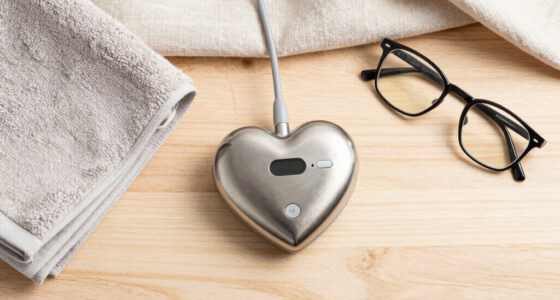
These systems are also called medical alert systems, personal emergency response systems, or medical alarms. A typical setup pairs a wearable button with a base station, mobile device, or phone connection. Pressing the button may reach a professional monitoring center or a list of chosen contacts, depending on the service.
This guide explains what happens when someone calls for help, which features deserve a closer look, and how to compare costs and coverage. You’ll also see why a device that fits a person’s daily routine may be more useful than one packed with features they rarely use.
Choose between an at-home, mobile, or phone-based system based on where the person spends time and whether the connection works there.
Ask exactly who answers a help call and what happens if the user cannot speak or does not respond.
Treat fall detection as an added layer because it can miss falls or send false alerts.
Check button range, water rating, speaker volume, charging routine, and backup power in the user’s actual home.
Compare equipment, monitoring, add-ons, contract terms, and cancellation fees to estimate the full cost.
What an emergency medical alert system can do for you
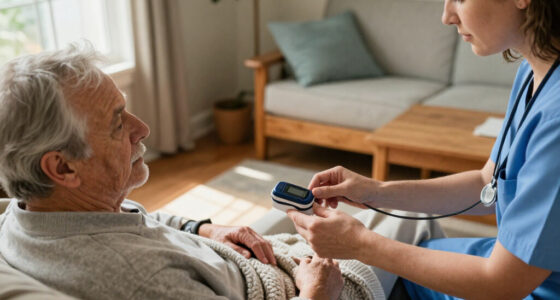
An emergency medical alert system gives someone a way to request help if they fall, feel unwell, or face another emergency. Most systems use a wearable button and a connection to a monitoring center or chosen contacts. The device can shorten the steps between needing help and reaching someone, but it does not replace emergency services or a wider care plan.
For example, imagine your father lives alone and slips near the kitchen counter. If he wears a pendant and can press it, the system can connect him to an agent or contact. If the pendant is charging in another room, the help button cannot do its job. That simple detail—whether the person actually wears it—matters as much as the feature list.
Some systems add fall detection, GPS location, caregiver alerts, or wellness check-ins. Those features can help in particular situations, but they do not guarantee that someone will be found or that every fall will trigger an alert. Think of the system as a doorbell to a response plan: it can summon attention, while people and emergency services provide the help.
These devices may suit older adults, people with disabilities, or anyone with a health condition who wants an easy way to reach help. A family caregiver may also feel more at ease knowing there is a clear contact path. The right choice depends on the user’s routine, comfort with technology, mobility, and preferences.
Products Worth Considering
Philips Sonicare 6500 Series Rechargeable Electric Toothbrush with 2 Brush Heads, White

Hyperice Hypervolt Go 3 Percussion Massage Gun with Carry Case

BowFlex Results Series 552 SelectTech Adjustable Dumbbell
As an affiliate, we earn on qualifying purchases.
See what happens after someone presses the button
When a user presses the help button, the device contacts either a monitoring center or a preselected contact, depending on how the system is set up. An agent may speak through the base unit or wearable, ask what happened, and contact family or emergency services. If nobody answers, the provider’s response steps determine what happens next.
Picture a user who feels dizzy in the garden. With a mobile system, they press the wearable button and speak with an agent through the device. With an at-home setup, they may need to remain close enough to the base station for its microphone and speaker to work. A system can look similar on a product page but handle that call in a different way.
Before buying, ask the provider to explain its response sequence in plain language. Does the service operate around the clock? If the user cannot speak, who gets called first? Does the agent have an address or location, and can the user list people who have access to the home? If family is called before emergency services, find out how the service handles a missed call.
- Check the connection: Find out whether the device uses a landline, cellular service, or a paired phone.
- Trace the call: Ask who answers and what happens if the user does not respond.
- Confirm access details: Check how responders receive the address, location, and any approved entry instructions.
That short conversation can reveal whether the system matches the way your family expects help to arrive.
Choose a connection that fits home and travel
At-home systems connect a wearable button to a base unit, often through a landline or cellular network. Mobile systems use cellular service and may add GPS, so a person can request help away from home. Smartphone-based options rely on an app or connected wearable, which means the phone must be charged, carried, connected, and configured properly.
For someone who spends most days at home, a base station and wearable may be straightforward. But an at-home button only works within its stated range from the base; walls, floors, and the building’s layout can affect that range. A person in a basement workshop or a back garden should check coverage there rather than assume the signal reaches every corner.
A mobile device may make more sense for someone who walks to the shops or visits friends alone. GPS can help share a location, yet accuracy can vary indoors, in rural areas, or where the signal is weak. Ask whether the service tests location before contacting help, and how it handles a location it cannot pinpoint.
Use this comparison as a starting point, then confirm the details with the provider:
| Connection | May fit someone who | Check before buying |
|---|---|---|
| At-home base | Usually stays at home | Button range, power backup, and landline or cellular requirements |
| Mobile device | Goes out alone | Cellular coverage, GPS limits, and charging routine |
| Phone or smartwatch app | Already carries and uses a phone | Pairing, battery, setup, and whether the phone must be nearby |
In a rural area with patchy cellular service, a mobile system may not work as expected. Confirm coverage at the places the person actually goes.
Treat fall detection as a backup, not a promise
Fall detection uses device sensors and software to identify a possible fall and send an alert without the user pressing the button. It can help when someone cannot reach the button or is unable to use it. No fall detection feature can promise to recognize every fall, and some devices may send false alarms.
For instance, a user who falls beside a sofa but remains conscious may be able to press a button and explain what happened. Someone who is briefly unable to move may benefit from an automatic alert. Yet a gentle slide onto a carpet or an unusual movement could go undetected—or be mistaken for a fall. Keep a wearable button accessible even if the service offers automatic detection.
Ask the provider how the feature works in practice: whether it contacts an agent automatically, whether the wearer can cancel an alert, and whether the feature costs extra. It may be most useful when a person has a known difficulty pressing a button, but its limits should be part of the decision.
Water resistance also deserves a practical check. A button that can be worn in the shower may be useful because it stays on during a daily routine when people often remove jewelry. Read the manufacturer’s water rating and care instructions; “water resistant” does not always mean a device is suitable for every bath or pool.
Use automatic detection as a backup layer. Keep the wearable accessible, and ask a qualified professional about individual safety needs.
A feature adds value when it fits the person’s needs and habits. The next question is whether they can keep the device ready each day.
Make the device easy to wear, hear, and charge
A medical alert system can only help when it is available and usable: the person needs access to it, a working connection, and power. Button size, speaker volume, two-way communication, and charging steps all affect whether the user will keep the device in their routine. A feature that looks impressive in an advert may be a poor fit if the person finds the device uncomfortable or hard to operate.
Suppose your aunt has limited dexterity and dislikes small buttons. Let her try the pendant and practice speaking through it before you choose. If she has difficulty hearing, check the speaker volume and ask whether the agent can communicate in a way she can follow. Keep the trial grounded in familiar moments: getting out of bed, making tea, and stepping into the shower.
Mobile devices need regular charging. A device left on a counter to charge is out of reach, and a depleted battery can leave the user without the protection they expected. Ask how long a charge lasts under normal use, what the low-battery alert looks or sounds like, and whether the charging dock is simple to handle.
Also check what happens during a power outage or cellular disruption. Some base units have backup power; the details and duration vary. Walk through the charging and backup routine with the user, then decide who will help if a battery alert appears or the connection fails.
- Choose a wearable the person likes enough to use every day.
- Test the sound and button size in the actual home.
- Agree on a charging place and a routine that keeps the device nearby.
- Check signal, range, and backup power where the person spends time.
These small tests turn a purchase into a workable habit.
Compare the full cost before you sign up
The price of a medical alert system can include equipment, activation, monthly monitoring, optional fall detection, and add-ons such as mobile service or caregiver apps. Providers set different contract, cancellation, return, warranty, and replacement terms, so a low monthly rate does not tell you the full cost. Compare the total you expect to pay over the period you plan to use the service.
For example, one provider might include a wearable and monitoring in its monthly plan, while another charges extra for a mobile device or fall detection. A family comparing the two should add the setup charge, monthly payments, optional features, and any shipping or return fees. The totals can look different once every line item is visible.
Ask whether you own the equipment or rent it, what happens if the user moves, and how to cancel if the system no longer fits. Check whether the provider offers a return period and what condition the equipment must be in. Read the service terms before relying on claims made in a phone call.
Some insurance or public programs may cover certain products in specific circumstances, but coverage is not universal. Verify eligibility directly with the insurer or relevant program before assuming a benefit will pay. Treating cost like a household budget decision—monthly bills, one-time fees, and possible replacement costs—makes the comparison clearer.
Build a simple plan around the alert system
An alert system works best as one part of a broader emergency plan. It can connect a person to help, but it does not replace medical care, emergency services, or routine contact with family and caregivers. The plan should say who responds, how they gain access if needed, and what to do if the device loses power or signal.
Imagine a neighbor checks on your mother every afternoon, while a monitoring center handles button presses overnight. Make sure the provider has current contact details and that the neighbor knows what to do if they receive an alert. If the user moves, changes phone numbers, or updates an emergency contact, update the system too.
Some newer devices connect to caregiver apps, smartphones, or smartwatches, and some offer notifications or check-ins. These options may help a family stay informed, but they can add setup and charging steps. Ask who can see the information, what triggers a notification, and whether the user is comfortable sharing it.
Before choosing, write down where the person spends time, how often they go out alone, whether they can use a phone, and what support is already in place. A person who rarely leaves home may prefer a simple base unit. Someone who walks to a nearby café may value a mobile device, as long as coverage and charging fit their routine.
The best system is the one the user accepts and the people around them know how to support. A brief practice call can make the process feel familiar before anyone needs it.
Frequently Asked Questions
Who should consider an emergency medical alert system?
It may suit an older adult, a person with a disability or chronic health condition, or anyone who wants a simple way to reach help while alone. The decision depends on daily routines, mobility, comfort with the device, and the support already available. A qualified professional can help discuss individual safety needs.
Can I use a medical alert system outside my home?
Some mobile systems use cellular service and may include GPS, so they can work away from home. Coverage and location accuracy depend on the network, surroundings, and device. Check service at the places the person visits rather than assuming it will work everywhere.
Does fall detection catch every fall?
No. Fall detection can miss some falls and may send false alarms, so it should not be treated as guaranteed detection. Keep a wearable help button accessible and ask the provider how an automatic alert is handled.
The response depends on the provider’s call procedure. Ask whether an agent will try to speak through the device, contact listed people, or request emergency services if the user does not answer. Confirm that the service has the correct address and any approved access instructions.
Will insurance or a public program pay for the system?
Some plans or programs may cover certain products in specific circumstances, but coverage is not universal. Contact the insurer or program directly to confirm eligibility, approved equipment, and any conditions before buying.
Conclusion
Choose a system around the person’s real routine: where they go, what they can comfortably wear, how they charge devices, and who should respond. Confirm the coverage, call sequence, feature limits, and full cost with the provider before signing up.
Then let the user practice wearing it and making a test call. A help button earns its place when it is close at hand, ready to connect, and familiar enough to use when the day takes an unexpected turn.