TL;DR

Turn quiet afternoons into listening time
- Thousands of audiobooks, podcasts and originals
- Listen on your phone, tablet or Echo — also offline
- Cancel anytime
Medical alert systems for seniors connect a wearable button or mobile device to a monitoring center or emergency contact when someone needs help. Compare home and mobile coverage, connectivity, battery life, fall detection, ease of use, and full subscription costs before choosing; then test the device in the places the wearer actually spends time.
A help button only works if it’s within reach when you need it. That simple detail can matter more than a sleek app, a long feature list, or a glossy brochure.
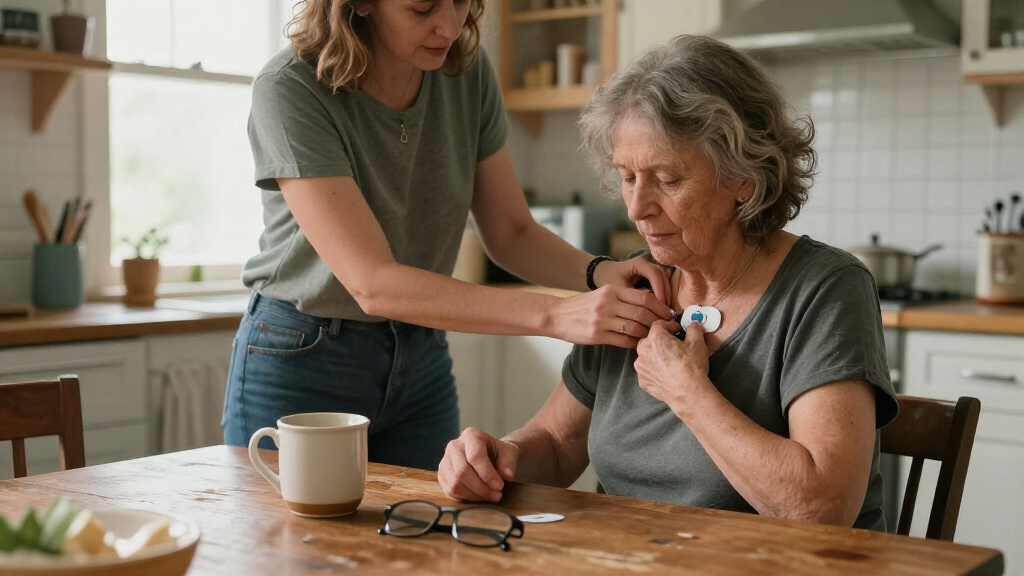
Medical alert systems for seniors are designed to provide seniors with immediate access to assistance, usually through a wearable pendant or wristband connected to a monitoring service. Some work mainly at home; mobile models can keep working on errands, in the garden, or during a walk.
This guide explains how the devices work, what separates home and mobile coverage, when fall detection can help, and which costs to check before signing up. You’ll also find a practical way to compare systems with a real routine in mind—because a device that sits charging on the kitchen counter cannot help when its wearer is upstairs.
Choose in-home or mobile coverage according to where the wearer spends an ordinary day, then test those exact places.
Treat fall detection as an extra safeguard, not a guarantee; keep the manual alert button accessible.
Compare a full 12-month cost, including equipment, activation, optional features, and cancellation terms.
Try the device for fit, button access, sound, and charging habits before relying on it.
Keep emergency contacts, entry instructions, and privacy preferences current.
How a medical alert system gets help to you
A medical alert system connects a wearable button or mobile device to a monitoring center or chosen contact so you can ask for help without reaching for a phone. Pressing the button usually opens a two-way voice connection; the responder can ask what happened and contact the people or emergency services listed for the account. This matters because an alert is only the start of the response: the person receiving it needs enough information to decide what to do next.
Most setups include a wearable pendant or wristband and either a home base station or a mobile unit. They typically include a speaker and microphone, plus a response plan that explains whom the monitoring center should call. The exact process depends on the provider, so ask whether a call goes to a staffed center, a family member, or both. A staffed center may be able to coordinate help when the wearer cannot explain the situation, while a contact-only setup may suit someone who has a nearby person ready to respond. The tradeoff is that family contacts may not be available at every hour.
For example, if Margaret slips beside her bed, she can press her pendant and speak to the responder through the base station. If she cannot speak clearly, the monitoring center can follow the instructions on her account. That plan should be accurate: an old phone number or a locked gate can slow down the next step. It should also reflect the wearer’s preferences, such as whom to call first and whether emergency services should be contacted if no one can confirm they are safe.
Before subscribing, ask how the center identifies the wearer, whether it can hear them from another room, and what happens if nobody answers. These details determine whether the system is useful in the actual situation it is meant to address, rather than merely confirming that a button was pressed. A clear answer is more useful than a vague promise of “24/7 protection.” The system supports a response plan; it does not replace emergency services, medical care, or a clinician’s advice.
senior medical alert system with fall detection
As an affiliate, we earn on qualifying purchases.
As an affiliate, we earn on qualifying purchases.
Choose home or mobile coverage based on a normal day
Medical alert systems for seniors generally fall into two practical groups: in-home systems that connect through a home base, and mobile systems that use cellular service to work away from home. Your routine is the best guide: someone who spends most of the day at home may value a simple base station, while a regular walker may need location-aware mobile coverage. The key tradeoff is convenience versus dependence on a portable device: a home setup can be simpler to charge and use, but its reach is limited; a mobile unit can travel, but only helps when it is carried, charged, and connected.
An in-home system may use a landline or cellular connection and pair with a wearable button. Its coverage depends on the base station and the wearable’s range, so test it from the garage, patio, and upstairs bathroom—not just beside the unit. Walls, distance, and the layout of the home can affect whether the base station can hear the wearer or the button can reach it. A mobile device can travel with its wearer, but it needs a working network and a charged battery. GPS may help responders locate the device, but it does not create cellular service where none exists, and location accuracy can vary.
| System type | Where it can help | What to check |
|---|---|---|
| In-home | Inside the home and possibly nearby areas | Wearable range, landline or cellular connection, power backup |
| Mobile | At home and out, where the device has service | Cellular coverage, GPS performance, charging routine |
| Fall detection add-on | May call for help after a detected fall | Detection limits, false alarms, extra monthly fee |
Imagine Robert tends a vegetable garden behind his house. A home unit might reach the kitchen but not the far end of the yard, while a mobile device may work there if cellular service is available. But if Robert dislikes carrying a larger unit or forgets to charge it, its theoretical range is not much practical protection. Ask the provider about a trial, test the actual spots, and confirm what happens in a dead zone before relying on coverage. Choosing based on a typical day—and the wearer’s habits—helps avoid paying for coverage that is rarely used or assuming protection in places the device cannot reach.
in-home medical alert pendant for seniors
As an affiliate, we earn on qualifying purchases.
As an affiliate, we earn on qualifying purchases.
Know what fall detection can—and cannot—do
Fall detection uses motion sensors to recognize movement patterns that may indicate a fall and can place an alert without requiring the wearer to press a button. It can add a layer of support if someone cannot reach or activate the device, but it does not detect every fall or prove that a fall has occurred. Think of it as a backup alert route, not a substitute for wearing and being able to use the manual button.
Current systems may use accelerometers and software that interpret movement. Some newer devices use machine-learning techniques, but performance varies by model and situation. A sudden sit on a soft sofa, a device tossed onto a bed, or a slow slide to the floor may produce a false alarm or go unnoticed. The tradeoff is that a sensor designed to avoid unnecessary alarms may miss some events, while one that alerts more readily may send more accidental calls. The wearer’s movements, how the device is worn, and the provider’s response process can all affect the experience.
Suppose Elaine trips on a rug while wearing a pendant. If the device detects the movement, it may connect her to the monitoring center; if it misses the event, she needs to press the button herself. This is why the pendant’s fit, comfort, and daily use matter as much as the detection feature. A sensor left in a drawer cannot call anyone. Even when worn, a device that is uncomfortable or difficult to keep charged can reduce the value of the extra feature.
Ask whether fall detection costs extra, how the provider describes its limits, and how it handles accidental alerts. Also ask whether a detected fall connects directly to a responder and what happens if the wearer cannot speak. Test the alert procedure with the company’s instructions rather than staging a fall. If fall risk or a recent injury is a concern, discuss safety planning with a qualified health professional; a consumer device is not a diagnosis or treatment.
mobile medical alert system for elderly
As an affiliate, we earn on qualifying purchases.
As an affiliate, we earn on qualifying purchases.
Compare the full cost, not just the monthly price
Medical alert system costs often combine a monthly subscription with equipment, activation, shipping, or optional-feature fees. The supplied research brief gives a broad reference range of about $20–$50 per month and initial equipment costs of roughly $50–$150; provider pricing changes, and not every plan uses the same fee structure. The advertised monthly price is therefore only one part of the decision: the total depends on how long the service is needed and which features are necessary for the wearer’s routine.
Make a one-year estimate before choosing. For example, a plan advertised at $30 a month totals $360 over 12 months, before any equipment or add-on fees. A second plan at $25 a month may cost more overall if it adds a larger activation fee or charges separately for fall detection. Comparing the same period and the same set of features makes it easier to see whether a higher-priced plan includes useful service or simply adds costs for features the household will not use.
Ask the provider to explain the total in writing, including cancellation rules and whether you must return rented equipment. Medicare typically does not cover medical alert systems, according to the supplied research brief, while some long-term care insurance policies may reimburse certain costs. Coverage varies by plan, so check directly with your insurer rather than assuming a benefit applies. Cancellation and equipment-return terms matter especially if the wearer’s living situation or care needs might change; an inexpensive monthly plan can be less flexible if it requires a long commitment or has return charges.
- Monthly monitoring: Ask what service the subscription includes.
- Equipment and setup: Check purchase, rental, activation, and shipping charges.
- Optional features: Confirm extra fees for mobile service, GPS, or fall detection.
- Leaving the plan: Ask about contract length, cancellation, and equipment returns.
A written quote helps you compare like with like. It also gives the senior and family a chance to decide whether a premium feature fits the budget and daily needs, rather than paying for extras that nobody uses. If the device is intended for occasional use or a short-term need, ask how that changes the overall cost and commitment before signing up.
elderly emergency call button wearable
As an affiliate, we earn on qualifying purchases.
As an affiliate, we earn on qualifying purchases.
Check these five details before you buy
The best system is the one the wearer can use reliably, so check real-world coverage, charging, comfort, accessibility, and the response plan before choosing. Each detail affects a different point in the chain between needing help and receiving it: the device must be nearby, working, usable, connected, and linked to a clear response. A device can boast GPS, reminders, or smart-home connections, but those extras matter less if its button is hard to press or its battery is dead.
- Map the routine. Write down where the person spends time: bedroom, shower, porch, garden, shops, or walking route. Match coverage to those places. This can reveal gaps that a general claim about “home coverage” misses, such as a detached garage or a regular walk beyond the neighborhood.
- Test the connection. Ask about landline, cellular, or internet requirements, then check service in the home and nearby outdoor areas. Connectivity is what carries an alert to the responder, so a dead zone is more than an inconvenience; it can interrupt the very function the system is meant to provide.
- Check fit and access. Try the pendant or wristband. Consider button size, hearing, vision, dexterity, and whether the person will wear it in the shower if the model is rated for that use. Comfort affects whether it is worn consistently, while button placement and size affect whether it can be activated during stress.
- Plan charging and backup. Find out how long the battery lasts, how the device signals low power, and what happens during an outage. A mobile unit may offer freedom away from home but adds a charging task; a home system may be easier to maintain but can depend on household power or a particular connection.
- Read the response steps. Confirm whom the center calls, how it handles no response, and whether the account has current contacts and access instructions. A fast connection is less useful if the responder cannot reach the home or the listed contact is unavailable.
For instance, a senior with arthritis may find a small recessed button frustrating, even if the device has excellent GPS. Ask to handle the equipment before committing and practice an alert with the provider’s guidance. The goal is a familiar motion—not another gadget that needs a manual every time someone feels unwell.
Some systems add medication reminders, health monitoring, GPS, or smart-home links such as door sensors. Treat these as optional tools, and ask what information they collect and who can see it. More features can provide useful context or convenience, but they can also mean more setup, charging, notifications, or privacy decisions. A simple pendant with a dependable connection may suit one household better than a feature-packed device that demands frequent charging.
Build a response plan that works beyond the button
A medical alert device works best as part of a clear response plan, not as a stand-alone promise that help will always arrive instantly. Keep emergency contacts current, explain how responders can enter the home, and make sure the wearer knows how to test the device and cancel an accidental alert. These preparations address a practical limit of the technology: an alert can communicate that help is needed, but people still need a workable way to reach the wearer and act on the information.
For example, Sam lives in a second-floor apartment with a locked lobby. His account should include the building’s entry instructions and a local contact who can meet responders if needed. Without those details, a call center may know that he needs help but not how to reach his door. The plan should match the building’s real access rules and be updated if contacts move or entry arrangements change.
Newer systems may connect with smart speakers, door sensors, GPS tools, or caregiver apps. These features can make it easier for a family member to check a location or receive an update, but they also raise practical questions: Does the senior consent to sharing location? Who receives alerts? What happens if a phone is offline? Better technology helps only when everyone understands its limits and privacy settings. More people receiving updates may provide reassurance, but it can also create confusion if nobody knows who is responsible for responding.
Set a regular check-in to review contact numbers, device wear, battery habits, and any change in mobility or routine. If the system offers a practice call, use the provider’s recommended process. A short rehearsal—button, voice connection, responder confirmation—can replace the mystery of an unfamiliar alarm with a familiar sequence. Reviewing the plan also helps identify when the current system no longer fits, such as after a move, a change in who provides care, or a new daily route.
Frequently Asked Questions
Can a medical alert system work outside the home?
Yes. Mobile systems use cellular connections and may include GPS to support alerts away from home. Check the provider’s network coverage and test the device along the wearer’s usual routes.
Are medical alert systems covered by Medicare?
The supplied research brief says medical alert systems are typically not covered by Medicare. Some long-term care insurance policies may reimburse costs, but benefits differ, so contact the insurer and provider to confirm details.
How much does a medical alert system cost?
The supplied brief gives a rough range of $20–$50 per month, with possible initial equipment costs of $50–$150. Treat those as reference figures, not a guaranteed quote; check add-ons, activation, shipping, and cancellation fees.
Does fall detection always identify a fall?
No. Fall detection can miss some falls or trigger a false alarm, and performance varies by device and circumstances. It can provide an extra alert route, but the wearer should still have access to the manual button.
What should I ask before signing up?
Ask about coverage, battery life, device fit, monitoring response steps, total fees, and cancellation rules. Also confirm whom the service calls, how responders enter the home, and whether optional features collect or share location or health data.
Conclusion
Choose the system around the wearer’s real day: where they go, what they can comfortably press, and how they will keep it charged. Then test the connection and write down a response plan before an emergency—not while a button is already flashing.
A useful alert system should feel less like another gadget and more like a small, dependable lifeline, ready wherever the day leads.
Cold & flu season Picks
humidifiers
As an affiliate, we earn on qualifying purchases.