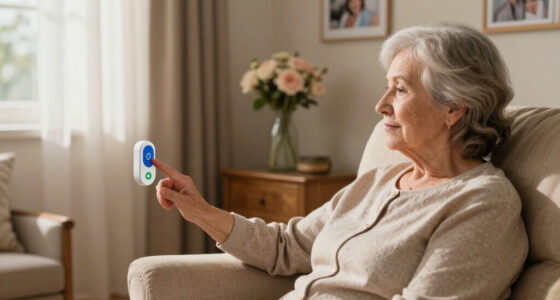
Assistive technology for seniors spans two very different jobs: emergency response when something goes wrong, and everyday support that prevents problems in the first place. The Senior HELP Dialer Medical Alert System earns my best overall pick because it delivers landline-based emergency calling with no monthly fees and no contracts, which is the single biggest cost trap in this category. For families managing a loved one at home, the Smart Caregiver Floor Mat Alarm stands out as the most effective wandering and fall-prevention tool under $100, while the Flipper Big Button TV Remote proves that small, inexpensive gadgets can eliminate daily frustration for seniors with dementia or low vision. The main tradeoff you’ll face is between subscription-free devices that depend on a caregiver answering the call, and monitored systems that cost monthly but guarantee a response center. Keep reading for the full breakdown of all 15 picks.
Complete the kit


Key Takeaways
- Subscription-free alert systems (Senior HELP Dialer, SkyAngel911FD, Life Guardian) dominated the value rankings — avoiding $25–$45 monthly monitoring fees saved $300+ per year, but they rely on family members answering their phones.
- Wearable call buttons (CallToU, DAYTECH) cost a fraction of medical alert systems and suit seniors whose main risk is needing help while a caregiver is elsewhere in the house, not living alone.
- Physical mobility aids (Vive Gait Belt, L1 Stand Assist, Vive Stand Assist) are the cheapest picks in the lineup but carry the highest injury risk if used incorrectly — technique matters more than the product.
- Dementia-friendly design separated the top daily-living picks: only the Flipper remote, photo-frame phone, and voice-announcing clock were genuinely usable without caregiver setup each day.
- Two of the fifteen products require WiFi or cellular infrastructure to work — a dealbreaker for rural homes and a reminder to match the technology to the senior‘s existing setup, not the other way around.
| Senior HELP Dialer Medical Alert System – No Monthly Fees |  | Best Fee-Free Medical Alert | Monthly Fees: None | Panic Buttons Included: 2 (wrist and necklace) | Range: 100 feet | VIEW LATEST PRICE | See Our Full Breakdown |
| Big Button Amplified Speakerphone Photo Frame with Speed Dial |  | Best for Staying Connected | Memory Keys: 10 photo speed-dial keys | Speakerphone: 2-way high-level amplified | Volume Control: Slide control | VIEW LATEST PRICE | See Our Full Breakdown |
| Flipper Big Button TV Remote for Seniors, Dementia – Easy Setup |  | Best for Dementia-Friendly Simplicity | Compatibility: All major TV brands and cable providers | Button Layout: Large, color-coded, tactile, four-button design | Favorite Channels: Up to 25 | VIEW LATEST PRICE | See Our Full Breakdown |
| Digital Alarm Clock with Date and Day of Week for Seniors, Voice Announcement, Multiple Alarms, Auto Dimming |  | Best for Memory Support | Display Size: 7 inches | Voice Announcement: Yes, in 9 languages | Alarm Settings: Multiple, including medication reminders | VIEW LATEST PRICE | See Our Full Breakdown |
| Smart Caregiver Floor Mat Alarm and Pager System – Wireless Alert for Fall and Wandering Prevention | 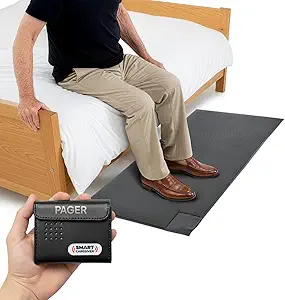 | Best for Caregiver Peace of Mind | Mat Dimensions: 24 in x 48 in | Alert Type: Wireless floor mat with pager | Pager Range: Up to 300 feet | VIEW LATEST PRICE | See Our Full Breakdown |
| CallToU Caregiver Pager with 2 Wireless Call Buttons |  | Best Simple Pager Value | Number of Call Buttons: 2 | Range: 500+ ft | Ringtone Options: 55 | VIEW LATEST PRICE | See Our Full Breakdown |
| JubileeTV Remote Care System for Seniors |  | Best Premium Remote Care | Compatibility: Most TVs with HDMI, Wi-Fi, and cable or streaming device | Remote: Large backlit voice remote | Membership Options: $29/month, $289/year, or $600 one-time | VIEW LATEST PRICE | See Our Full Breakdown |
| Senior Elderly Medical Alert System – No Subscription |  | Best No-Fee Emergency Alert | No Monthly Fees: Yes | Waterproof: Yes | Range: 150 feet | VIEW LATEST PRICE | See Our Full Breakdown |
| Vive Gait Belt (350 lbs) Transfer Belt with Handles |  | Best for Caregiver Transfers | Weight Capacity: 350 lbs | Waist Size: Up to 51 inches | Width: 4 inches | VIEW LATEST PRICE | See Our Full Breakdown |
| DAYTECH WiFi Caregiver Call Button with Phone Alerts |  | Best Smart Caregiver Pick | Connectivity: Wi-Fi 2.4GHz | Number of Buttons: 2 | Included Accessories: Wristband, plug-in receiver | VIEW LATEST PRICE | See Our Full Breakdown |
| SkyAngel911FD 4G Mobile Cellular Emergency Device with No Monthly Fee |  | Best On-the-Go Emergency Pick | Network: 4G cellular | Monthly Fees: None | Emergency Calling: One-touch 911 with 2-way speakerphone | VIEW LATEST PRICE | See Our Full Breakdown |
| Vive Car Handle Assist for Elderly – Scratch Proof Latch – Auto Grab Bar |  | Best for Car Independence | Support Weight: 300 pounds | Material: Composite with scratch-proof latch | Compatibility: Most cars, trucks, and SUVs | VIEW LATEST PRICE | See Our Full Breakdown |
| L1 Stand Assist Rail for Couch and Chair |  | Best Premium Standing Rail | Support Weight: 300 lbs | Material: Aircraft-grade aluminum and stainless steel | Adjustability: Width and height adjustable | VIEW LATEST PRICE | See Our Full Breakdown |
| Life Guardian Medical Alarm Emergency Alert SOS System |  | Best Home Alert System Without Fees | Alert Buttons Supported: Up to 10 | Emergency Contacts: Up to 3 with personalized messages | Message Length: 7 seconds | VIEW LATEST PRICE | See Our Full Breakdown |
| Vive Stand Assist – Mobility Standing Aid Rail for Couch, Chair |  | Best Value Standing Rail | Support Weight: 300 pounds | Material: Aluminum frame | Handle Padding: Soft foam | VIEW LATEST PRICE | See Our Full Breakdown |
More Details on Our Top Picks
Senior HELP Dialer Medical Alert System – No Monthly Fees
Most medical alert systems quietly drain a wallet with monthly monitoring fees, and this dialer’s biggest selling point is that it refuses to. Instead of routing emergencies through a call center, the wrist and necklace panic buttons dial up to three personal contacts with a recorded message, which works well when family lives nearby. Compared with the Senior Elderly Medical Alert System further down this roundup, the Senior HELP Dialer stands out for including two wearable buttons rather than one, and its water-resistant design covers the bathroom, where falls often happen. The tradeoff is real, though: with no GPS and a 100-foot range, this is a home-only solution. Buyers wanting location tracking on walks or errands should look at the SkyAngel911FD 4G instead.
Pros:- No monthly fees, avoiding the recurring cost of monitored services
- Two wearable panic buttons (wrist and necklace) included
- Water-resistant and safe for pacemaker users
- Personalized outgoing message tells contacts who needs help
Cons:- Requires a landline or a separately sold Bluetooth adapter for cell phones
- Caps out at three emergency contacts with no professional backup
- No GPS or location tracking of any kind
Best for: Seniors living at home with nearby family or friends who can answer an emergency call without paying subscription costs
Not ideal for: Active seniors who leave the house alone — there’s no GPS, cellular fallback, or professional monitoring
- Monthly Fees:None
- Panic Buttons Included:2 (wrist and necklace)
- Range:100 feet
- Water Resistant:Yes
- Pacemaker Safe:Yes
- Phone Connection:Standard phone line or Bluetooth adapter (sold separately)
- Emergency Contacts:Up to 3
Our verdict“This pick makes the most sense for homebound seniors whose family wants emergency coverage without a subscription.”
Big Button Amplified Speakerphone Photo Frame with Speed Dial
For seniors who find smartphone screens baffling, this phone replaces scrolling with something far simpler: ten photo keys where a picture of a grandchild becomes the button that calls them. That visual shortcut is the whole point, and it works because no batteries or AC power are needed — the phone line itself powers it, so it keeps working in outages that knock out cordless handsets. Compared with the DAYTECH WiFi Call Button, which summons a caregiver rather than placing calls, this speakerphone is about independence and social connection rather than alerts. The amplified two-way speakerphone also helps users with limited mobility keep conversations hands-free. The catch is stubbornly analog design: landline-only, no Bluetooth, and nothing for households that have cut the cord entirely.
Pros:- Photo memory keys let users dial by recognizing faces, not remembering numbers
- Powers entirely from the phone jack, no batteries or outlets needed
- Wall-mountable with backup memory for power interruptions
- Adjustable speaker volume and ringer for hearing-impaired users
Cons:- Landline-only, useless without a compatible phone connection
- No modern connectivity like Bluetooth or wireless expansion
Best for: Seniors with memory loss or low vision who still have a landline and want one-touch calling to family
Not ideal for: Cell-only or VoIP-centric households — this phone has no wireless or Bluetooth support
- Memory Keys:10 photo speed-dial keys
- Speakerphone:2-way high-level amplified
- Volume Control:Slide control
- Dialing Modes:Normal / one-touch toggle
- Ringer Volume:Off / Low / High switch
- Power Source:Phone jack (no batteries or AC)
- Wall Mountable:Yes
- Backup Memory:Yes
Our verdict“If a landline exists and the goal is effortless calls to loved ones, this photo-dial phone is the easiest bridge to independence.”
Flipper Big Button TV Remote for Seniors, Dementia – Easy Setup
Standard remotes bury power and volume among fifty cryptic buttons, and for a parent with dementia, that clutter becomes a daily source of frustration. The Flipper strips television down to a four-button layout with large, color-coded, tactile keys, and locks in up to 25 favorite channels so channel-surfing confusion disappears. This option stands out for deliberately doing less than a universal remote: no streaming apps, no smart TV menus, no settings to accidentally wreck. Compared with the JubileeTV Remote Care System, which offers remote management by family members at a higher price and complexity, the Flipper is the set-and-forget choice — configure it once and it just works with all major TV brands and cable boxes. The tradeoff is a hard ceiling: households built around Netflix or Roku apps will find it useless, and the two AA batteries arrive separately.
Pros:- Four large, color-coded, tactile buttons eliminate remote confusion
- Universal compatibility with major TV brands and cable providers
- Favorite channel lock-in prevents accidental channel scrambling
- Setup is genuinely simple for caregivers to configure once
Cons:- No support for streaming apps or smart TV navigation
- Requires 2 AA batteries that aren’t included
- Limited to basic TV functions only
Best for: Seniors with dementia, low vision, or dexterity issues who watch traditional cable or antenna TV
Not ideal for: Streaming-first households — this remote cannot open apps or control smart TV menus
- Compatibility:All major TV brands and cable providers
- Button Layout:Large, color-coded, tactile, four-button design
- Favorite Channels:Up to 25
- Batteries:2 AA (not included)
- Streaming Support:No
Our verdict“The right pick when the goal is a parent who can operate the TV alone again, as long as streaming isn’t part of the routine.”
Digital Alarm Clock with Date and Day of Week for Seniors, Voice Announcement, Multiple Alarms, Auto Dimming
Orientation is one of the first things memory loss takes, and this clock quietly gives it back with a 7-inch display that spells out the date and day of the week alongside the time. The voice announcement in nine languages doubles the information for users whose vision can’t be trusted, and the multiple alarm slots double as medication reminders — a genuinely practical feature that rivals single-purpose pill timers. Where the Flipper Big Button Remote simplifies one device, this clock reinforces routine across the whole day. The auto-dimming display (50–250 cd/m²) prevents the harsh overnight glow that disturbs sleep, a small detail that matters a lot in a bedroom. Documentation is thin on the power source and deeper customization, which means buyers should confirm outlet compatibility before committing.
Pros:- Large 7-inch display shows full date and day of week at a glance
- Voice announcement in 9 languages supports users with poor vision
- Multiple alarms work as medication and appointment reminders
- Auto-dimming backlight reduces overnight eye strain
Cons:- Power source details are unspecified in product documentation
- Little information available about advanced customization options
Best for: Seniors with dementia, memory loss, or low vision who need daily orientation and medication reminders
Not ideal for: Buyers wanting smart-home integration or detailed app-based scheduling — this clock keeps things basic
- Display Size:7 inches
- Voice Announcement:Yes, in 9 languages
- Alarm Settings:Multiple, including medication reminders
- Auto Dimming:Yes
- Backlight Brightness:50–250 cd/m²
- Best Placement:Bedroom or living area
Our verdict“A low-cost way to restore daily orientation and pill schedules for a parent who keeps losing track of the day.”
Smart Caregiver Floor Mat Alarm and Pager System – Wireless Alert for Fall and Wandering Prevention
This system flips the alert equation: instead of the senior pressing a button, a pressure-sensitive 24×48-inch floor mat detects when they step on it and wirelessly pages the caregiver up to 300 feet away. Placed beside a bed or at a doorway, it catches the exact moment someone at fall risk gets up unassisted — or when a dementia patient wanders toward an exit. Compared with the CallToU Caregiver Pager, which depends on the senior pressing a call button, this mat works even when the user forgets or can’t act, making it the stronger choice for advanced dementia. The pager’s audible and vibrate modes let night-shift caregivers silence the tone while still feeling the alert. It’s a single-sensor system, though, so full-home coverage means buying additional mats, and batteries come separately.
Pros:- Detects movement automatically, no button-pressing required from the senior
- 300-foot wireless pager range covers most homes
- Audible and vibrate alert options for discreet nighttime monitoring
- Expandable with other Smart Caregiver safety devices
Cons:- Batteries not included, requiring an extra purchase before first use
- One mat only — larger homes need additional sensors for full coverage
- Useless without a caregiver present to receive the page
Best for: Family and professional caregivers monitoring nighttime bed exits or dementia-related wandering
Not ideal for: Seniors living alone — there’s no auto-dial function, so it only helps when a caregiver is within pager range
- Mat Dimensions:24 in x 48 in
- Alert Type:Wireless floor mat with pager
- Pager Range:Up to 300 feet
- Alert Modes:Audible and vibrate
- Batteries:2 AA (not included)
- Warranty:1 year
- Expandable:Compatible with other Smart Caregiver devices
Our verdict“The most sensible choice for caregivers who need to know the instant an at-risk senior gets out of bed or heads for the door.”
CallToU Caregiver Pager with 2 Wireless Call Buttons
For families who just need a dependable way to hear when a loved one needs help, this pager keeps things refreshingly uncomplicated. No apps, no Wi-Fi, no subscription — the two waterproof buttons pair with a portable receiver and just work. Compared with the DAYTECH WiFi Call Button, this system trades smartphone alerts for simplicity, which makes it far easier for a non-technical caregiver to set up in minutes. The 500+ ft range outclasses many pricier options and covers most single-family homes plus a backyard or garden. The tradeoff is that it only helps when someone is home to hear the receiver — unlike the landline-based Senior Elderly Medical Alert System, it cannot dial out to family or 911. Battery life details are also thin, so plan on periodic checks.
Pros:- 500+ ft wireless range covers large homes and yards
- Two waterproof buttons usable in the bathroom or shower
- 55 ringtones and 5 volume levels to cut through hearing loss or noise
- No subscription, app, or Wi-Fi required
Cons:- Receiver must stay plugged into an outlet
- Cannot call remote family members or emergency services
- Battery life and replacement details are not clearly documented
Best for: Live-in caregivers and family members who want a low-cost, no-setup-fuss way to be summoned from anywhere in the house
Not ideal for: Households where caregivers work away from home and need phone-based or emergency-dialing alerts
- Number of Call Buttons:2
- Range:500+ ft
- Ringtone Options:55
- Volume Levels:5
- Waterproof:Yes
- Dustproof:Yes
Our verdict“The most sensible pick for in-home caregivers who need an affordable, subscription-free way to be alerted instantly.”
JubileeTV Remote Care System for Seniors
This is the most ambitious option in the lineup: it turns the TV a senior already watches into a caregiving hub. Family members can remotely fix channels, start video calls, and push reminders or photos straight to the screen — which is why it earns the premium slot. Whereas the CallToU pager only alerts someone inside the house, JubileeTV is built for long-distance caregivers who cannot drop by every time the remote confuses Mom. The large backlit voice remote is a genuine advantage over standard remotes, and it complements a simpler device like the Flipper Big Button TV Remote rather than duplicating it. The catch is cost: full functionality sits behind a mandatory membership ($29/month or up to $600 one-time), it is U.S.-only, and it still requires an existing cable or streaming setup to work.
Pros:- Video calls and reminders display on the TV seniors already use daily
- Large backlit voice remote is senior-friendly
- Remote troubleshooting means fewer caregiver visits just to fix the TV
- Simple setup with broad HDMI TV compatibility
Cons:- Requires a paid membership for full functionality
- Available in the U.S. only
- Needs an existing cable, satellite, or streaming device
Best for: Out-of-town adult children who want to stay visually connected and troubleshoot their parent’s TV and routines remotely
Not ideal for: Budget-conscious buyers or anyone outside the U.S., since ongoing membership fees and regional limits apply
- Compatibility:Most TVs with HDMI, Wi-Fi, and cable or streaming device
- Remote:Large backlit voice remote
- Membership Options:$29/month, $289/year, or $600 one-time
- Key Features:Remote TV control, video calling, on-screen reminders and media
- Availability:U.S. only
Our verdict“Worth the membership cost only if remote, screen-based connection with an aging parent is a daily need rather than an occasional one.”
Senior Elderly Medical Alert System – No Subscription
Unlike the CallToU pager, which only summons someone already in the house, this system actually dials out — cycling through emergency contacts or reaching 911 through a landline. That makes it the closest thing here to a traditional medical alert service without the monthly bill, which is exactly why it claims the no-fee slot. The waterproof wrist and necklace panic buttons work in the shower, where falls are most common, and setup is genuinely plug-and-play. Compared with subscription-based systems like Life Guardian, the obvious saving adds up to hundreds of dollars a year. The tradeoff is infrastructure: it leans on a landline connection, and households that have dropped landline service will need the optional cell adapter. The 150-ft button range is also noticeably shorter than the CallToU’s 500+ ft.
Pros:- One-time purchase with no monthly fees or contract
- Waterproof panic buttons safe for shower and bath use
- Calls up to emergency contacts or 911 automatically
- Covers up to 70,000+ square feet of living space
Cons:- Requires a landline or optional cell phone adapter
- 150-ft button range is shorter than competing pagers
- No caregiver app or remote monitoring features
Best for: Seniors living alone with an existing landline who want 24/7 emergency dialing with zero recurring costs
Not ideal for: Cord-cutting households without a landline, unless they buy the cellular adapter
- No Monthly Fees:Yes
- Waterproof:Yes
- Range:150 feet
- Coverage Area:70,000+ square feet
- Connection:Landline (optional cell phone adaptor)
- Buttons Included:Wrist and necklace panic buttons
Our verdict“The strongest choice for landline-equipped seniors who refuse to pay a subscription for peace of mind.”
Vive Gait Belt (350 lbs) Transfer Belt with Handles
Every other product here alerts or communicates — this one prevents the fall in the first place. The Vive Gait Belt is for the physical act of helping a senior stand, walk, or transfer, and its seven padded handles are what set it apart: a caregiver can get a secure grip from any angle, whether lifting from a chair or steadying someone mid-walk. The 350-lb capacity and 51-inch waist adjustment make it one of the few options that works for bariatric patients, where cheaper four-handle belts fall short. It pairs naturally with standing aids like the Vive Stand Assist rail, covering both the person’s own leverage and the caregiver’s support. The 4-inch width, great for larger patients, can feel bulky on a petite frame, and no belt substitutes for proper transfer training — used wrong, any gait belt can cause injury.
Pros:- 350-lb weight capacity supports bariatric patients
- Seven padded handles give secure grip from any angle
- Adjustable up to 51-inch waists with quick-release buckle
- Durable nylon construction withstands daily professional use
Cons:- 4-inch width can be uncomfortable or loose on smaller patients
- Requires proper training to use safely
- Minimal color or style options
Best for: Family caregivers or aides regularly assisting heavier seniors with standing, walking, and chair or bed transfers
Not ideal for: Casual or untrained helpers handling one-off lifts — improper use can injure both parties
- Weight Capacity:350 lbs
- Waist Size:Up to 51 inches
- Width:4 inches
- Material:Nylon, plastic, metal
- Handles:7 padded handles
- Closure:Adjustable quick-release buckle
Our verdict“An essential, low-cost safety tool for anyone physically assisting a senior with mobility — as long as you learn correct technique.”
DAYTECH WiFi Caregiver Call Button with Phone Alerts
Think of this as the CallToU pager upgraded for the smartphone era. It keeps the familiar formula — two call buttons plus a loud plug-in receiver — but adds Wi-Fi app notifications that can be shared with multiple family members, so a press of a button reaches the daughter across town, not just whoever is in the kitchen. That shared-alert feature is the real differentiator, and it fills the gap between a basic pager and a full emergency dialer like the Senior Elderly Medical Alert System. The included wristband also makes the button harder to lose than a standalone puck. The costs of that smartness: setup requires 2.4GHz Wi-Fi and an app, which may frustrate less tech-savvy caregivers, and there is no cellular fallback if the internet drops. Compared with the premium JubileeTV, it does far less but costs far less and has no membership.
Pros:- Phone app alerts reach remote family members instantly
- Alerts can be shared among multiple caregivers
- Wristband keeps the call button on the senior at all times
- Customizable sounds and volume with a loud in-home receiver
Cons:- Requires 2.4GHz Wi-Fi and app setup
- Receiver must be plugged into an outlet
- No cellular connectivity if the internet goes down
Best for: Tech-comfortable families where multiple relatives share caregiving duties across different locations
Not ideal for: Homes without reliable Wi-Fi, or seniors whose caregivers want zero app-based setup
- Connectivity:Wi-Fi 2.4GHz
- Number of Buttons:2
- Included Accessories:Wristband, plug-in receiver
- Alert Types:In-home receiver, app notifications to multiple users
- Battery:1 x 12V (included)
- Dimensions:4.8 x 4.1 x 3.6 inches
- Weight:10.2 ounces
Our verdict“The smart middle ground between a basic in-home pager and a subscription alert service — ideal for connected families with dependable Wi-Fi.”
SkyAngel911FD 4G Mobile Cellular Emergency Device with No Monthly Fee
Most devices in this roundup tether a senior to the house — the SkyAngel911FD is the rare option that works anywhere with 4G coverage. One button connects straight to a 911 operator through a built-in speakerphone, and automatic fall detection adds a layer of protection the Life Guardian home system can’t offer outside its 150-foot range. The tradeoff is scope: unlike monitored services, there’s no call center, no caregiver notification, and no GPS location sharing, so a dispatcher relies on the user to explain where they are. The no monthly fee model is genuinely appealing compared with subscription systems, but families should confirm the product’s 4G band still works on networks in their area before buying.
Pros:- Works away from home anywhere with cellular coverage
- No monthly fees or contracts of any kind
- Automatic fall detection without a subscription
- Waterproof design safe for showers and rain
Cons:- No monitoring service, caregiver alerts, or GPS location sharing
- Completely dependent on local cellular network coverage
Best for: Active seniors who leave home alone — walkers, gardeners, and drivers who want emergency backup beyond the house
Not ideal for: Seniors who may be unable to speak or explain their location during a crisis — this calls 911 directly with no monitoring center to assist
- Network:4G cellular
- Monthly Fees:None
- Emergency Calling:One-touch 911 with 2-way speakerphone
- Fall Detection:Automatic
- Waterproof:Yes (up to 10 minutes submerged)
- Size:Small, keychain-sized
Our verdict“This pick makes the most sense for independent seniors whose biggest risk lies outside the home, as long as they can communicate with a 911 dispatcher.”
Vive Car Handle Assist for Elderly – Scratch Proof Latch – Auto Grab Bar
Getting out of a car is a distinct mobility problem that indoor rails like the L1 Stand Assist can’t touch, and that’s exactly the gap this Vive Car Handle Assist fills. It hooks into the door latch striker — no installation, no tools — and gives a stable leverage point that a door frame or a caregiver’s arm can’t match, supporting up to 300 pounds. Compared with the Vive Gait Belt elsewhere in this roundup, which requires a second person present, this handle lets a senior exit the vehicle entirely on their own. The catch is fit and technique: it only works on compatible door latches, and users must position it correctly or it becomes a wobbly handhold rather than a solid one.
Pros:- Tool-free setup using the existing door latch
- Portable enough to keep in a purse or glovebox
- Ergonomic cushioned grip reduces hand strain
- Supports up to 300 pounds
Cons:- Only works on compatible door latch types
- Requires correct positioning each use to be safe
Best for: Seniors who still drive or ride frequently and struggle with the stand-up-and-pivot motion of leaving a car seat
Not ideal for: Households needing help inside the home too — this does nothing for chairs, beds, or bathrooms, so a home rail is the better spend
- Support Weight:300 pounds
- Material:Composite with scratch-proof latch
- Compatibility:Most cars, trucks, and SUVs
- Installation:Tool-free, hooks into door latch
- Grip:Ergonomic, cushioned
- Warranty:60 days
Our verdict“A cheap, targeted fix for the single most common away-from-home mobility stumble — worth keeping in the car even if you own home rails too.”
L1 Stand Assist Rail for Couch and Chair
Among the two standing rails in this roundup, the L1 Stand Assist takes the more engineered approach: aircraft-grade aluminum and stainless steel, plus dual width and height adjustment so it fits everything from a slim armchair to a deep sofa. Compared with the Vive Stand Assist, the L1’s adjustability makes it the stronger choice for households with mixed furniture or taller users who need the handle at a different height. The foam-padded grip is comfortable for arthritic hands, and the 300-pound rating feels conservative given the build quality. Be realistic about the limits, though — it explicitly won’t work with recliners or electric lift chairs, and it relies on removable, firm cushions staying in place, so a sagging old sofa undermines the whole setup.
Pros:- Width and height adjustable for a precise fit
- Premium materials with a solid 300 lb rating
- Padded handles comfortable for arthritic hands
- Works across most cushioned sofas and chairs
Cons:- Incompatible with recliners and electric lift chairs
- Stability depends on firm, removable cushions
Best for: Buyers with multiple seating types or specific height needs who want the most adjustable, durable standing rail available
Not ideal for: Recliner or power-lift chair owners — the cushion-mounted design is incompatible with both
- Support Weight:300 lbs
- Material:Aircraft-grade aluminum and stainless steel
- Adjustability:Width and height adjustable
- Handle Padding:Soft foam
- Compatibility:Most cushioned seating; not recliners or electric chairs
- Minimum Cushion Thickness:Over 4 inches
Our verdict“The pick when fit precision matters more than price — worth the premium over simpler rails for tall users or varied furniture.”
Life Guardian Medical Alarm Emergency Alert SOS System
The Life Guardian HD700V5 is built for a specific scenario: a senior who lives alone but has family or neighbors nearby who can actually respond. One press of a waterproof panic button calls up to three contacts with a personalized 7-second recorded message, and the 150-foot range covers a typical house and yard. Compared with the SkyAngel911FD, this system is safer for someone who might panic speaking to a 911 dispatcher — a familiar voice arrives first instead. The no-monthly-fee setup beats subscription medical alerts on cost, but it demands a working phone line or optional adapters, and there’s no professional monitoring if none of the three contacts picks up.
Pros:- No monthly fees or monitoring contracts
- Waterproof buttons wearable in shower and bath
- 150-foot range covers most homes and yards
- Supports up to 10 buttons and three personalized contacts
Cons:- Requires a landline or optional cell/Bluetooth adapters
- No professional monitoring if personal contacts don’t answer
Best for: Seniors living alone with responsive family or neighbors nearby who want a fee-free way to summon help at home
Not ideal for: Anyone without a landline or reliable nearby contacts — without a responder, the alerts go nowhere useful
- Alert Buttons Supported:Up to 10
- Emergency Contacts:Up to 3 with personalized messages
- Message Length:7 seconds
- Range:150 feet
- Waterproof:Yes
- Connectivity:Home phone line; optional Bluetooth and cell adapter
- Included:2 waterproof panic buttons (necklace and wrist)
Our verdict“The smart fee-free choice for home safety when family is the real first-response plan rather than a call center.”
Vive Stand Assist – Mobility Standing Aid Rail for Couch, Chair
The Vive Stand Assist is the simpler, cheaper sibling in this roundup’s rail pairing, and for many buyers that’s the right call. It slides around or beneath cushions with no real installation, and the adjustable aluminum frame handles sofas, armchairs, and even recliners — one category the pricier L1 Stand Assist explicitly excludes. The tradeoff is fit flexibility: there’s no fine height tuning, so shorter or very tall users may find the handle position less natural than the L1’s dual adjustment. For a standard living room chair and a senior of average height, though, the padded grips and 300-pound rating deliver the same core benefit at a lower price, making this the value pick rather than the precision one.
Pros:- Works with recliners as well as standard chairs
- Simple installation with no tools required
- Adjustable frame with padded, secure grips
- Supports up to 300 pounds
Cons:- Limited height adjustment compared with dual-adjustable rails
- May not fit all chair shapes or cushion sizes
Best for: Budget-conscious buyers with a standard chair or sofa — especially recliners — who need basic standing support
Not ideal for: Households with very tall or short users needing exact handle heights — the L1’s adjustability justifies its higher price there
- Support Weight:300 pounds
- Material:Aluminum frame
- Handle Padding:Soft foam
- Installation:Fits around or beneath cushions
- Compatibility:Chairs, sofas, and recliners
- Adjustability:Adjustable frame
Our verdict“The best-value standing rail if your furniture is conventional and you’d rather save the difference than pay for precision adjustability.”
How We Picked
I evaluated each product against four buyer-centered criteria. Safety impact came first: does the device actually reduce fall risk, speed up emergency response, or prevent wandering? Usability without tech literacy was second, because assistive technology fails the moment a senior can’t operate it — big buttons, voice prompts, and one-touch operation scored far higher than app-dependent systems. Total cost of ownership weighed subscription-free devices against monthly-fee alternatives, since a $30 pager that replaces a $35/month monitored service changes the math dramatically. Finally, I judged setup burden on the caregiver, because someone has to install and maintain these devices.
Ranking followed impact per dollar and reliability of the underlying connection. Landline and standalone devices ranked higher than WiFi-dependent ones because they keep working when internet or power fails. Within categories, I favored models with longer wireless range, waterproofing, and battery backup — features that matter precisely when emergencies happen.
Factors to Consider When Choosing Assistive Technology For Seniors
Choosing assistive technology is less about finding the most advanced gadget and more about matching the device to one specific risk, one specific senior, and one specific home. These are the factors that most often make or break a purchase.Start With the Risk You’re Actually Managing
The most common mistake families make is buying a medical alert system when the real problem is something else entirely. A senior who falls at night needs bed rails and lighting before a pendant; a senior who wanders needs a floor mat alarm before a call button. Write down the two or three scenarios that genuinely worry you, then buy for those. A device that addresses a real, observed risk will get used daily; a device bought out of vague anxiety usually ends up in a drawer. This is also why my rankings mix emergency alerts with mundane items like car handles and TV remotes — dignity and independence are safety issues too.
Subscription vs. No-Fee: Do the Three-Year Math
A no-fee alert system costs $40–$100 once; a monitored system costs roughly $300–$500 per year, every year. Monitored services justify the price with a 24/7 response center, which matters if the senior lives alone and family can’t reliably answer a call. If a caregiver is home most of the time, a no-fee dialer that calls your cell phone directly does nearly the same job for a fraction of the cost. The mistake to avoid is paying for monitoring you don’t need — or skipping it to save money when the senior genuinely lives alone. Also check whether cellular-based no-fee devices like the SkyAngel911FD still work in your area’s coverage, since a dead signal makes the savings irrelevant.
Connection Requirements and Failure Modes
Every device in this category depends on something: landline, WiFi, cellular signal, or battery power. Before buying, ask what happens when that dependency fails. WiFi call buttons stop working during internet outages; cellular devices need charged batteries and coverage; even landline dialers fail if phone service is cut. Battery backup and range specs matter more than marketing suggests — a pager with 500 feet of range covers a typical house and yard, while shorter-range units drop calls through walls. For seniors in rural areas, I’d steer toward landline or standalone RF devices and away from WiFi-dependent models entirely.
Dementia Changes Every Design Requirement
Devices built for physically frail but cognitively sharp seniors fail badly with dementia. Small buttons, menu navigation, and anything requiring the senior to remember a sequence are non-starters. Look instead for photo-based speed dial, single-function remotes that lock out confusing inputs, and clocks that announce the day and date aloud. Alarms intended to manage wandering — like floor mats — need to alert the caregiver quietly rather than startle the senior, since agitation amplifies confusion. If dementia is progressive, buy for the senior’s abilities six months from now, not today.
Caregiver Physical Safety Is Not Optional
Gait belts, stand assists, and car handles protect two people at once, and the caregiver is often the one injured. A transfer gone wrong causes back injuries that end informal caregiving entirely. Handles and rails need to be rated for the senior’s actual weight — the Vive Gait Belt’s 350-pound bariatric rating exists for a reason — and anchored or positioned correctly. Watch instruction videos before the first use, because technique failures, not product failures, cause most transfer injuries. If transfers are already difficult or painful, that’s the signal to bring in professional assessment rather than buy another gadget.
Adoption: The Senior Has to Want to Use It
The best device is worthless if the senior refuses to wear, press, or keep it charged. Pendants get abandoned because they feel stigmatizing; remotes get shelved when they’re confusing. Involve the senior in the choice where possible, and frame devices around independence rather than surveillance — a photo-frame phone that lets them call family looks like a gift, while a tracking system feels like monitoring. Start with one device, confirm it’s actually used for two weeks, then add more. Layering five gadgets at once is a reliable way to get zero of them adopted.
Frequently Asked Questions
Is a no-monthly-fee medical alert system actually safe enough for a senior who lives alone?
It depends almost entirely on whether someone reliably answers the phone. No-fee systems like the Senior HELP Dialer and Life Guardian dial pre-programmed family numbers instead of a professional response center, so their weakness is the busy signal, the missed call, or the family member in a meeting. For seniors who live alone with no nearby family, a monitored subscription is worth the $25–$40 monthly cost because a trained dispatcher answers within seconds, around the clock. For seniors with a spouse at home or family nearby who answer reliably, the no-fee approach provides the same core function — one-button help — for a one-time cost. A reasonable middle path is a no-fee dialer as the primary device plus a cellular unit like the SkyAngel911FD that can dial 911 directly when family can’t be reached.
What’s the difference between a caregiver pager and a medical alert system, and which do I need?
A caregiver pager, like the CallToU or DAYTECH systems, is a short-range intercom: a wearable button signals a receiver somewhere else in the house, and it only works if a person is there to hear it. A medical alert system contacts outside help — family phone numbers or a monitoring center. Pagers cost $25–$60 and are the right tool when the senior’s main risk is needing assistance while a caregiver is in another room, doing laundry, or sleeping down the hall. Medical alerts are the right tool when the senior might be alone for hours. Many families actually need both: the pager for everyday requests that don’t justify an emergency call, and the alert system for genuine crises. Buying only a pager for a senior who lives alone is the single most dangerous mistake in this category.
Are floor mat alarms worth it for dementia wandering, or are they just noise?
A well-placed floor mat alarm is one of the highest-value purchases in dementia care because it intervenes at the moment of risk, not after. Positioned beside the bed or at the bedroom doorway, the mat alerts the caregiver the instant the senior’s feet hit the floor at 3 a.m. — exactly when unassisted wandering leads to falls. The failure mode is placement and caregiver proximity: the mat only helps if someone can respond within a minute or two, so it’s a tool for homes with an overnight caregiver, not for seniors living alone. Choose a model with a pager or silent receiver rather than a loud alarm in the senior’s room, since sudden noise increases confusion and agitation in dementia patients. Also expect the useful window to be finite — as wandering becomes more severe, you’ll need to add door sensors or supervised care.
Can a big-button phone or remote really make a difference, or is it a minor convenience?
Daily-living devices often deliver more quality-of-life improvement per dollar than any safety gadget in this lineup. A senior who can’t work a standard remote may watch television independently again with a Flipper — that’s hours of daily routine restored, plus one less reason to call a busy family member for help. Photo-frame speed dial removes the need to remember or even read numbers, which is the specific barrier that stops seniors with dementia or low vision from calling at all. These devices also work preventively: frustration with technology is a documented driver of social withdrawal and sedentary behavior. At $25–$60 each, they’re the cheapest independence gains available, and I’d recommend buying them before any expensive alert system.
Do I need professional installation or assessment for stand assists and transfer equipment?
For simple items like the Vive car handle and the L1 couch rail, no — but correct positioning still matters, so read the setup guidance carefully and test stability before the senior puts full weight on it. For gait belts and any transfer involving a senior with significant weakness, at least one session with a physical therapist or occupational therapist is worth the cost. Transfer injuries overwhelmingly come from poor technique rather than defective equipment, and a therapist can teach body mechanics that protect the caregiver’s back. If the senior is near or above 300 pounds, verify weight ratings explicitly and consider a bariatric-rated belt like the Vive 350-pound model. And if transfers are becoming a two-person job or causing pain, that’s the point where equipment alone isn’t the answer and professional care评估 — I mean assessment — is needed.
Conclusion
Match the pick to the buyer, not the other way around. For best overall, the Senior HELP Dialer Medical Alert System balances emergency coverage, zero ongoing fees, and simple operation better than anything else here. The best value pick is the CallToU Caregiver Pager, which solves the most common in-home scenario — a senior needing help while the caregiver is elsewhere — for under $40. For a premium setup, the JubileeTV Remote Care System lets family manage the senior’s TV, calls, and check-ins remotely, justifying its higher price for long-distance caregivers. Beginners and anyone buying their first device should start with the Flipper Big Button TV Remote or the photo-frame phone — inexpensive, zero-risk, and immediate proof that assistive tech can work for your senior. For specific needs: dementia wandering calls for the Smart Caregiver Floor Mat Alarm, fall-risk transfers call for the Vive Gait Belt paired with a stand assist, and seniors who leave the house need the cellular SkyAngel911FD. Whatever you choose, buy for one identified risk at a time and confirm the device actually gets used before adding the next.