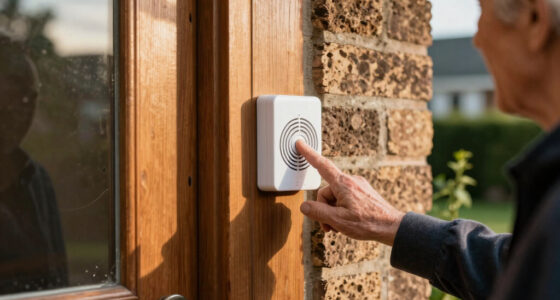
For seniors, the best video doorbell camera is one that answers a simple question: can you see and talk to a visitor without fumbling with a phone? That’s why the Wireless 1080p Video Doorbell Camera with 4.3-Inch Monitor takes my top spot — it pairs the doorbell with a plug-in indoor monitor, so there’s no app, no account, and no subscription to manage. The Tapo D210 stands out as the best smart option for seniors comfortable with a phone, offering sharp 2K video and a physical chime without monthly fees, while the budget-friendly Wyze Wireless Battery Video Doorbell makes sense when cost is the driving factor. The main tradeoff in this category is between monitor-based systems that work like a familiar landline video phone and app-based systems that offer smarter alerts but demand more tech comfort. Subscription fees are the second fault line: several picks here record locally for free, while others quietly charge monthly. Keep reading for the full breakdown of all 15 models and which one fits your household.

Turn quiet afternoons into listening time
- Thousands of audiobooks, podcasts and originals
- Listen on your phone, tablet or Echo — also offline
- Cancel anytime
Complete the kit


Key Takeaways
- Monitor-based doorbells (products 1, 2, 6, 10, 11, 12, 15) dominated the senior-friendly rankings because they eliminate the smartphone app entirely — the single biggest usability barrier in this category.
- The KALOGL and FunnyPanda monitor models distinguish themselves with local storage on a screen-based system, meaning no SD card swapping at the doorbell and no cloud fees, but their monitors are smaller than the best overall pick’s.
- Ring‘s Battery Doorbell 2K appears twice (Speckled Gray and Matte Mocha) with identical hardware — the color choice is cosmetic, so pick the cheaper listing, not the higher-ranked one.
- The Arlo 2K and Chamberlain myQ offer the sharpest video and smartest motion detection in the lineup, but both push hardest toward paid subscriptions, which makes them better for a tech-savvy senior or a caregiver managing the device remotely.
- Across all 15 products, the 4.3-inch indoor monitor emerged as the sweet spot: big enough for aging eyes, small enough to keep on a kitchen counter, and far simpler than any phone-based rival.
| Wireless 1080p Video Doorbell Camera with 4.3-Inch Monitor |  | Best for No-Wi-Fi Homes | Video resolution: 1080p | Camera viewing angle: 120 degrees | Indoor monitor: 4.3-inch IPS screen | VIEW LATEST PRICE | See Our Full Breakdown |
| Winnes Wireless Doorbell Camera with 1080p Monitor |  | Best Value Monitor Kit | Resolution: 1080p | Viewing angle: 170° | Display: 4.3-inch IPS screen | VIEW LATEST PRICE | See Our Full Breakdown |
| Chamberlain myQ Video Doorbell with 2K Camera |  | Best for Garage-Connected Homes | Resolution: 2K | Field of view: 150° | Night vision: Color Night Vision | VIEW LATEST PRICE | See Our Full Breakdown |
| Arlo Video Doorbell 2K (2nd Gen), Wireless or Wired, 1-Camera |  | Best Premium Smart Pick | Video resolution: 2K | Field of view: 180 degrees, head-to-toe | Power options: Rechargeable battery or wired trickle charging | VIEW LATEST PRICE | See Our Full Breakdown |
| Ring Battery Doorbell 2K (2nd Gen), Speckled Gray |  | Best for Alexa Households | Video resolution: Retinal 2K | Zoom: Up to 6x enhanced zoom | Field of view: 140° horizontal, 140° vertical | VIEW LATEST PRICE | See Our Full Breakdown |
| TKMARS Wireless Video Doorbell with 4.3-Inch Monitor |  | Best for No-Wi-Fi Households | Screen size: 4.3 inches | Camera viewing angle: 170° | Connection: Private 2.4 GHz link, no Wi-Fi needed | VIEW LATEST PRICE | See Our Full Breakdown |
| Wyze Wireless Battery Video Doorbell Camera |  | Best Value for Family Caregivers | Resolution: 1536 × 1536 HD+ | Field of view: 150° × 150° head-to-toe | Power: Rechargeable battery or hardwired | VIEW LATEST PRICE | See Our Full Breakdown |
| Tapo D210 2K Wireless Smart Video Doorbell with Chime |  | Best Premium Feature Set | Resolution: 2K | Field of view: 160° diagonal | Battery capacity: 6400 mAh rechargeable | VIEW LATEST PRICE | See Our Full Breakdown |
| Orbitell 1080p Wireless Video Doorbell Camera |  | Best for Quieter Streets | Resolution: 1080p | Connectivity: 2.4GHz Wi-Fi | Audio: Two-way | VIEW LATEST PRICE | See Our Full Breakdown |
| TKMARS Wireless Video Doorbell Camera with 4.3-Inch Monitor |  | Best Budget-Friendly Monitor Pick | Monitor screen: 4.3-inch IPS | Connection: Direct private 2.4 GHz, no home Wi-Fi required | Viewing angle: 170° | VIEW LATEST PRICE | See Our Full Breakdown |
| FunnyPanda Wireless Video Doorbell Camera with 4.5-Inch Monitor |  | Best for Wi-Fi-Free Simplicity | Video resolution: 720p | Screen size: 4.5 inches | Viewing angle: 120° | VIEW LATEST PRICE | See Our Full Breakdown |
| KALOGL Wireless Video Doorbell with Screen, 1080p, Two-Way Audio, Local Storage, and Night Vision |  | Best Clarity Without an App | Video resolution: 1080p | Field of view: 160° | Audio: Two-way | VIEW LATEST PRICE | See Our Full Breakdown |
| Ring Battery Doorbell 2K (2nd Gen) – Matte Mocha | | Best Smart Home Pick | Video resolution: Retinal 2K | Zoom: 6x enhanced zoom | Field of view: 140° horizontal, 140° vertical | VIEW LATEST PRICE | See Our Full Breakdown |
| BOIFUN Wireless 2K HD Video Doorbell Camera | 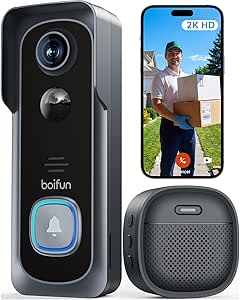 | Best Value App-Based Pick | Resolution: 2K HD | Field of view: 166° | Battery: 5200 mAh, up to 60 days (lab conditions) | VIEW LATEST PRICE | See Our Full Breakdown |
| TKMARS Wireless Video Doorbell with Monitor, 170° View, Local Recording |  | Best Wide-Angle No-Wi-Fi Pick | Monitor screen: 4.3-inch IPS | Field of view: 170° | Connection: Private 2.4 GHz wireless, no Wi-Fi needed | VIEW LATEST PRICE | See Our Full Breakdown |
| video doorbell cameras for senior | Field of view |
|---|---|
| Wireless 1080p Video Doorbell | — |
| Winnes Wireless Doorbell Camer | — |
| Chamberlain myQ Video Doorbell | 150° |
| Arlo Video Doorbell 2K | 180 degrees, head-to-toe |
| Ring Battery Doorbell 2K | 140° horizontal, 140° vertical |
| TKMARS Wireless Video Doorbell | — |
| Wyze Wireless Battery Video Do | 150° × 150° head-to-toe |
| Tapo D210 2K Wireless Smart Vi | 160° diagonal |
| Orbitell 1080p Wireless Video | — |
| TKMARS Wireless Video Doorbell | — |
| FunnyPanda Wireless Video Door | — |
| KALOGL Wireless Video Doorbell | 160° |
| Ring Battery Doorbell 2K | 140° horizontal, 140° vertical |
| BOIFUN Wireless 2K HD Video Do | 166° |
| TKMARS Wireless Video Doorbell | 170° |
More Details on Our Top Picks
Wireless 1080p Video Doorbell Camera with 4.3-Inch Monitor
This pick makes the most sense for seniors who want nothing to do with apps, accounts, or monthly fees. The private Bluetooth connection between the outdoor camera and the 4.3-inch indoor monitor means everything works straight out of the box — no router setup, no smartphone required, no subscription ever. Compared with the Ring Battery Doorbell 2K, which depends on Wi-Fi and a paid plan for full function, this setup simply shows you who’s at the door on a screen that never leaves the hallway. Recording to a microSD card keeps footage local and private. The tradeoffs are real, though: the monitor must stay plugged in, the SD card costs extra, and there’s no way to check the camera remotely when you’re away from home.
Pros:- Works entirely without Wi-Fi, an app, or subscription fees
- Dedicated 4.3-inch indoor screen that’s always ready
- Two-way audio and night vision included
- IP65 weatherproof outdoor unit with tool-free adhesive installation
Cons:- Indoor monitor must remain plugged in at all times
- MicroSD card for video recording is not included
- No remote viewing when you’re away from home
Best for: Seniors without Wi-Fi or smartphones who want a plug-in screen that shows visitors instantly with zero setup friction
Not ideal for: Anyone who wants to see who’s at the door from their phone while away — the Bluetooth monitor only works inside the house
- Video resolution:1080p
- Camera viewing angle:120 degrees
- Indoor monitor:4.3-inch IPS screen
- Connectivity:Wireless Bluetooth, no Wi-Fi needed
- Doorbell battery:1800mAh rechargeable, up to 2 months per charge
- Storage:Snapshots without SD card; video via 8GB–32GB microSD (not included)
- Water resistance:IP65
- Installation:Adhesive tape; no drilling or hardwiring
Our verdict“The right choice for seniors who want a screen-based doorbell that works with no internet, no app, and no ongoing costs.”
Winnes Wireless Doorbell Camera with 1080p Monitor
Where the first wireless-monitor option on this list plays it safe with a 120° lens, the Winnes widens the picture to 170° — enough to see packages on the ground and visitors standing off to the side. Like that model, it runs on a direct Bluetooth link to a 4.3-inch screen, so there’s no Wi-Fi, app, or subscription to wrestle with, and it undercuts the smart doorbells here by skipping cloud costs entirely. The compact two-piece design mounts on a wall or door without an electrician. But the wider lens comes with quirks: you can only view the camera when someone actually rings, walls and iron doors can shrink the 50–80 meter range, and the 1000mAh battery is smaller than the 1800mAh unit in the competing kit, so it needs recharging more often.
Pros:- Extra-wide 170° viewing angle catches packages and side approaches
- No Wi-Fi, app, or subscription fees at any point
- IP65-rated outdoor unit with two-way audio
- Lightweight 8-ounce design mounts to wall or door
Cons:- Camera can only be viewed when the doorbell is rung
- Smaller 1000mAh battery needs more frequent recharging than competing kits
- Monitor must stay connected to power and the SD card is sold separately
Best for: Budget-conscious buyers who want a wider view than typical monitor kits offer and don’t mind charging the doorbell more frequently
Not ideal for: Homes with thick walls or metal doors — the Bluetooth range and standby time may drop noticeably
- Resolution:1080p
- Viewing angle:170°
- Display:4.3-inch IPS screen
- Camera battery:1000mAh rechargeable, 800–900 rings per charge
- Transmission range:50–80 meters in open air
- Water resistance:IP65
- Storage:Snapshots standard; video requires microSD card (not included)
- Mounting:Wall or door mount
Our verdict“A wider-angle, budget-friendly alternative to standard monitor kits for seniors who value a broader view over long battery life.”
Chamberlain myQ Video Doorbell with 2K Camera
This option stands out for 2K resolution and Color Night Vision, a meaningful step up in clarity over the 1080p monitor kits above — faces and license plates stay recognizable after dark. The flexible battery or wired installation means seniors with existing doorbell wiring can go permanent and never recharge, while everyone else uses the included USB-C cable. Because it’s part of the myQ ecosystem, this model makes the most sense for households that already run a Chamberlain or LiftMaster smart garage opener and want door and garage in one app. Compared with the Arlo below, the tradeoff is ecosystem depth: Arlo covers more smart home platforms, while myQ doubles down on garage integration. The catch is that AI person and face alerts require a separately sold monitoring plan, and the wireless chime isn’t available yet, so battery users may need their phone nearby to hear alerts.
Pros:- Sharp 2K video with a 150° wide-angle lens
- Color Night Vision keeps footage usable after dark
- Battery or wired installation with USB-C recharging
- Integrates with the myQ garage ecosystem
Cons:- AI face and person alerts require a paid monitoring plan
- Wireless chime accessory is not yet available
- Requires Wi-Fi and app setup, unlike the monitor kits in this roundup
Best for: Homeowners with myQ or Chamberlain smart garage openers who want door and garage alerts in one system
Not ideal for: Seniors without Wi-Fi or a smartphone — this doorbell depends entirely on the app for alerts
- Resolution:2K
- Field of view:150°
- Night vision:Color Night Vision
- Power options:Battery or wired
- Connectivity:Bluetooth, Wi-Fi
- Mount type:Wall mount, outdoor rated for extreme temperatures
- Included items:Doorbell, charging cable, hardware bag, mounting plate
Our verdict“A sharp, weather-tough pick for myQ households that don’t mind a subscription for the smartest alerts.”
Arlo Video Doorbell 2K (2nd Gen), Wireless or Wired, 1-Camera
For seniors comfortable with a smartphone — or with family who’ll manage it for them — this is the most capable doorbell in this batch. The head-to-toe 180° field of view shows a full visitor from head to shoes, and the remote siren lets a family member scare off porch pirates from anywhere, something no monitor-only kit here can do. Its compatibility with Alexa, Apple Home, Google Home, and SmartThings is broader than the myQ’s garage-focused ecosystem, so it fits almost any household tech. Installation stays flexible with a rechargeable battery or wired trickle charging. The honest tradeoff: after the one-month Arlo Secure trial, cloud video history and advanced alerts sit behind a paid plan. Without it, you still get live viewing and two-way audio, but the recorded evidence — often the whole point — disappears.
Pros:- 2K video with a head-to-toe 180° field of view
- Remote siren and two-way audio for deterring unwanted visitors
- Works with Alexa, Apple Home, Google Home, and SmartThings
- Wireless or wired installation with IP65 weather resistance
Cons:- Advanced features and cloud history require a paid plan after the trial
- More complex setup than the no-app monitor kits in this roundup
Best for: Tech-comfortable seniors or families who want full smart home integration and can share camera access with relatives
Not ideal for: Anyone opposed to ongoing subscription costs — the most useful recording features stop after the trial month
- Video resolution:2K
- Field of view:180 degrees, head-to-toe
- Power options:Rechargeable battery or wired trickle charging
- Weather resistance:IP65
- Connectivity:2.4 GHz Wi-Fi
- Smart home compatibility:Alexa, Apple Home, Google Home, SmartThings, IFTTT
- Cloud video history:60 days with Arlo Secure plan
Our verdict“The strongest overall smart doorbell here, provided a subscription fits the budget and someone in the household can handle app setup.”
Ring Battery Doorbell 2K (2nd Gen), Speckled Gray
Compared with the Arlo above, this Ring narrows the lens to 140° but adds up to 6x enhanced zoom, letting a senior zoom in on a face or a package label without walking to the door — a genuinely useful detail for anyone with limited mobility. Alexa integration is the real draw: Echo devices announce visitors and show the feed by voice, so there’s no fumbling with a phone when the doorbell rings. Live View, motion alerts, and two-way talk all work out of the box, and the built-in rechargeable battery means no wiring. The tradeoffs mirror Arlo’s — video storage and richer alerts need a Ring Protect subscription — plus two annoyances: no USB-C cable in the box, and video quality dips on slower internet, so a weak router at the front door is a real problem.
Pros:- Retinal 2K video with up to 6x zoom for checking details from a chair
- Alexa devices can announce and display visitors hands-free
- Head-to-toe 140° by 140° field of view
- Built-in rechargeable battery, no wiring required
Cons:- Video storage and key features require a separate Ring Protect subscription
- USB-C charging cable is not included
- Video quality drops on slower internet connections
Best for: Seniors who already own Echo speakers or displays and want visitors announced by voice throughout the house
Not ideal for: Homes with slow or distant Wi-Fi — the single-band connection and video quality depend heavily on bandwidth
- Video resolution:Retinal 2K
- Zoom:Up to 6x enhanced zoom
- Field of view:140° horizontal, 140° vertical
- Power:Built-in lithium-ion battery, rechargeable via USB-C
- Connectivity:Wi-Fi 4, 2.4 GHz single band
- Operating conditions:-4°F to 120°F, weather resistant
- Recommended upload speed:At least 10 Mbps
Our verdict“The natural pick for Alexa-equipped homes, trading Arlo’s wider lens for zoom and voice-driven convenience.”
TKMARS Wireless Video Doorbell with 4.3-Inch Monitor
For seniors who don’t have home Wi-Fi — or who have zero interest in managing an app — this pick stands out because it skips both entirely. The doorbell talks directly to its 4.3-inch indoor monitor over a private 2.4 GHz link, so seeing who’s at the door is as simple as glancing at a screen on a table. Compared with the Wyze Wireless Battery Video Doorbell, there’s no phone setup, no account creation, and no cloud anything, which removes the single biggest setup barrier for less tech-confident users. The tradeoff is real, though: video is low resolution (300 kilopixels), the memory card is sold separately, and the wireless range can shrink behind metal doors or thick walls, so placement matters. The 4000 mAh battery lasting up to three months makes it genuinely low-maintenance.
Pros:- Works without Wi-Fi, an app, or any subscription
- Indoor monitor with two-way audio and active wake-up
- Wide 170° view with LED night vision
- Long-lasting 4000 mAh rechargeable battery
Cons:- Memory card not included
- Wireless range drops behind walls and metal doors
- Very low video resolution compared with app-based rivals
Best for: Seniors without home Wi-Fi who want a plug-in-and-go monitor instead of a smartphone app
Not ideal for: Anyone wanting sharp, detailed footage — the low-resolution video makes identifying fine details like faces at a distance harder
- Screen size:4.3 inches
- Camera viewing angle:170°
- Connection:Private 2.4 GHz link, no Wi-Fi needed
- Doorbell battery:4000 mAh rechargeable, up to 3 months
- Recording:Local loop recording to MicroSD (8–32 GB, sold separately)
- Night vision:LED-assisted
- Wireless range:5–30 m, reduced by obstacles
Our verdict“This model makes the most sense for seniors who want to see visitors on a tabletop screen with no Wi-Fi, app, or subscription involved.”
Wyze Wireless Battery Video Doorbell Camera
Where the TKMARS monitor-based models keep everything inside the house, this option shines for families who check in remotely — adult children can view the 1536 × 1536 HD+ feed from anywhere and confirm Mom answered the door or that a package arrived. The head-to-toe 150° × 150° view is the standout: it catches packages on the ground that squarer doorbells miss, and it works equally well on battery or hardwired. Compared with the Tapo D210, the resolution is lower and there’s no built-in person detection at this tier, but Wyze supports up to a 256 GB microSD card for local recording without a subscription. The compromises: the microSD card and chime are sold separately, and 24/7 continuous recording only works if you hardwire it — on battery alone, you get motion-triggered clips only.
Pros:- Head-to-toe view captures both visitors and packages
- Battery or hardwired installation flexibility
- Local microSD recording up to 256 GB with no subscription
- Works with Alexa, Google Assistant, and IFTTT
Cons:- microSD card and chime accessories sold separately
- 24/7 local recording requires hardwired power
Best for: Families who want affordable remote monitoring and package visibility without mandatory subscription fees
Not ideal for: Seniors without reliable Wi-Fi or a family member to handle app setup, since the camera is essentially useless without the app
- Resolution:1536 × 1536 HD+
- Field of view:150° × 150° head-to-toe
- Power:Rechargeable battery or hardwired
- Battery life:Up to 6 months
- Storage:microSD up to 256 GB (sold separately)
- Night vision:Color
- Compatibility:Alexa, Google Assistant, IFTTT
Our verdict“The strongest pick when a caregiver will manage the app and wants sharp, tall-framed footage of the doorway for minimal cost.”
Tapo D210 2K Wireless Smart Video Doorbell with Chime
This model is better suited to seniors (and their families) who want fewer false alarms and clearer footage than the rest of this lineup offers. The 2K resolution and 160° view beat the Wyze and Orbitell entries on detail, and free person detection with customizable activity zones means the phone only buzzes when a person actually approaches — not when a car passes or a cat wanders through. That filtering matters a lot for seniors who may get anxious about constant, meaningless notifications. Compared with the Orbitell 1080p, the Tapo also includes a chime in the box and a 15° mounting wedge for tricky doorframe angles, plus a large 6400 mAh battery. The tradeoffs: the microSD card costs extra, video history in the cloud needs a Tapo Care subscription, and battery life varies with traffic and weather.
Pros:- 2K video with wide 160° diagonal view
- Free person detection and activity zones
- Local microSD recording up to 512 GB, no subscription
- Included chime and 15° mounting wedge
Cons:- microSD card sold separately
- Cloud video history requires Tapo Care subscription
- Battery life varies with usage and conditions
Best for: Seniors and caregivers who want the sharpest picture and smart person-only alerts to cut notification noise
Not ideal for: Households wanting everything in the box and zero ongoing costs — the storage card is extra and cloud history is subscription-only
- Resolution:2K
- Field of view:160° diagonal
- Battery capacity:6400 mAh rechargeable
- Storage:microSD up to 512 GB (not included) or Tapo Care cloud
- Night vision:Full color with adjustable spotlight
- Compatibility:Amazon Alexa, Google Assistant
- Wi-Fi:2.4 GHz
- Encryption:AES 128-bit, TLS 1.2
Our verdict“This pick makes the most sense when image clarity and accurate person alerts are worth paying a premium for over budget rivals.”
Orbitell 1080p Wireless Video Doorbell Camera
The Orbitell earns its spot through AI person detection that filters out vehicles and animals, which translates to a phone that only alerts for actual visitors. For a senior living on a busy road, that difference is the whole story — a basic motion doorbell on the same street would ping constantly and quickly get muted or ignored. Compared with the Tapo D210, you give up resolution (1080p vs 2K) and local storage, since Orbitell leans on encrypted cloud, and pre-capture recording — the few seconds before motion starts — is locked behind a subscription. Setup is straightforward and the IP65 weather resistance handles exposed doorways well. It’s 2.4 GHz only, so homes with mesh routers broadcasting just 5 GHz will need to enable the slower band first, which is a small but real setup hurdle.
Pros:- AI person detection filters vehicles and animals
- Two-way audio with real-time alerts
- IP65 weather-resistant enclosure
- Encrypted cloud storage and infrared night vision
Cons:- 2.4GHz Wi-Fi only, incompatible with 5GHz-only networks
- Pre-capture recording requires a cloud subscription
- No local storage option
Best for: Seniors on busy streets or near pet areas who need motion alerts that ignore cars and animals
Not ideal for: Anyone wanting local, subscription-free recording or living somewhere cloud storage feels unnecessary — there’s no microSD option
- Resolution:1080p
- Connectivity:2.4GHz Wi-Fi
- Audio:Two-way
- Night vision:Infrared LEDs
- Storage:Encrypted cloud storage
- Weather resistance:IP65
- Installation:Wireless
Our verdict“A sensible middle choice for seniors whose biggest frustration would be constant false alerts from passing traffic or pets.”
TKMARS Wireless Video Doorbell Camera with 4.3-Inch Monitor
Compared with the TKMARS K18S earlier in this list, this sibling model trades battery longevity and resolution for a friendlier price and a lighter package. Like its sibling, it runs entirely without Wi-Fi, an app, or a subscription, pairing directly with a 4.3-inch IPS monitor seniors can keep by their chair. The 170° view and night vision carry over, and the IP65 rating is a genuine upgrade over some monitor-based rivals in this guide. But the differences matter: the outdoor unit’s 1800 mAh battery lasts roughly a month between charges versus up to three on the K18S, video is limited to 480p, and the indoor monitor really needs to stay plugged into USB-C continuously — so treat it as a wired screen, not a portable one. For the money, though, it’s the easiest entry point into monitor-style doorbells.
Pros:- Works without Wi-Fi, app, or subscription
- Monitor shows visitors without any smartphone
- IP65 weather resistance and night vision
- Local recording with no cloud storage required
Cons:- Outdoor battery lasts only about a month per charge
- Indoor monitor needs continuous USB-C power
- microSD card not included
Best for: Budget-conscious seniors who want a no-app, no-Wi-Fi monitor setup and don’t mind monthly recharging
Not ideal for: Anyone wanting to grab the monitor and carry it room to room — the small 400 mAh battery means it should stay on its charger
- Monitor screen:4.3-inch IPS
- Connection:Direct private 2.4 GHz, no home Wi-Fi required
- Viewing angle:170°
- Video resolution:480p
- Outdoor battery:Rechargeable 1800 mAh, up to 1 month
- Recording:Doorbell-triggered local recording, 8–32 GB TF/microSD (not included)
- Weather resistance:IP65
- Range:16–98 ft indoors, reduced by obstacles
Our verdict“This model makes the most sense for seniors who want the simplest possible monitor doorbell at the lowest commitment, accepting more frequent charging.”
FunnyPanda Wireless Video Doorbell Camera with 4.5-Inch Monitor
For a senior who has never installed an app and does not want to, this model takes the smartest path: it skips Wi-Fi entirely and connects point-to-point to its own 4.5-inch indoor monitor. When someone rings, the visitor appears on a physical screen — no phone unlock, no password, no notification to chase. Compared with the Ring Battery Doorbell 2K, the video quality here is softer at 720p, but the tradeoff is a setup that a family member can finish in an afternoon with zero recurring costs. Local recording to a TF card keeps a record of visitors without a subscription, which matters for buyers on a fixed income. The main frustration is that the card is sold separately, and the monitor really wants to stay plugged into a DC 5V outlet for daily use, so plan for a nearby power socket.
Pros:- No Wi-Fi, app, or subscription needed for full function
- Dedicated 4.5-inch monitor shows visitors instantly
- Local TF card recording up to 128GB keeps footage private
- Two-way audio and infrared night vision included
Cons:- TF card not included in the box
- 720p video is noticeably softer than 2K rivals like the Ring
- Indoor monitor needs continuous DC power for regular use
Best for: Seniors without home Wi-Fi or smartphones who want a walk-up screen they can see without touching a phone
Not ideal for: Remote family caregivers — without an app or cloud access, adult children cannot check the camera from out of town
- Video resolution:720p
- Screen size:4.5 inches
- Viewing angle:120°
- Connection:2.4GHz point-to-point, no Wi-Fi required
- Wireless range:Approximately 16–262 ft
- Recording:MP4 to TF card up to 128GB (not included)
- Night vision:Six 940nm infrared LEDs
Our verdict“This pick makes the most sense for seniors who want a screen-based doorbell with zero internet dependency and no monthly fees.”
KALOGL Wireless Video Doorbell with Screen, 1080p, Two-Way Audio, Local Storage, and Night Vision
This model splits the difference between the app-free FunnyPanda and the app-driven BOIFUN 2K. Like FunnyPanda, it has a built-in screen for live viewing without any app or account, but it upgrades the picture to 1080p and widens coverage to 160°, so faces and packages are easier to make out. The two-way audio lets a senior answer the door without walking to it — a genuine safety benefit for anyone with limited mobility. Storage stays local on a microSD card, which means no subscription and no cloud dependence, though the card arrives separately. Because the unit is battery powered, expect periodic recharging, and the Bluetooth-based setup is less polished than Ring’s guided install. Compared with Ring, you give up remote phone access and Alexa integration in exchange for a screen you can simply look at.
Pros:- 1080p video with a wide 160° field of view
- Built-in screen needs no app, Wi-Fi, or subscription
- Local microSD recording keeps footage in-house
- Two-way audio lets seniors answer the door remotely
Cons:- microSD card not included
- Battery requires periodic recharging
- No remote phone viewing for family caregivers
Best for: Buyers who want sharper-than-basic 1080p video and an on-device screen but still refuse to manage a smartphone app
Not ideal for: Tech-comfortable households that want motion alerts on their phone or voice-assistant integration
- Video resolution:1080p
- Field of view:160°
- Audio:Two-way
- Storage:Local recording to microSD (not included)
- Connectivity:Wireless with Bluetooth protocol
- Power source:Rechargeable battery
- Night vision:Yes
- Dimensions:2 x 1 x 4 inches
Our verdict“A solid middle ground for seniors who want better image quality than the FunnyPanda without crossing into app-based systems.”
Ring Battery Doorbell 2K (2nd Gen) – Matte Mocha
Where every other doorbell in this batch is app-optional or app-free, Ring is unapologetically app-first — and for a senior living with Alexa devices, that ecosystem is the whole point. Announcements like “someone is at the front door” can play on an Echo speaker automatically, so the senior never has to reach for a phone. Retinal 2K video with 6x zoom is the sharpest picture here, clearly out-resolving both the KALOGL 1080p and the FunnyPanda 720p, and the head-to-toe 140° view catches packages left on the ground. The tradeoffs are real: video storage and advanced AI alerts require a paid Ring Protect plan, the USB-C charging cable is oddly absent from the box, and the home needs at least 10 Mbps upload speed. Compare that to the BOIFUN, which asks for no subscription at all, and the cost picture changes over a few years.
Pros:- Sharpest video in this group: 2K with 6x zoom
- Alexa announcements make alerts audible without a phone
- Head-to-toe 140° view captures packages and visitors fully
- Quick 10-minute wireless installation with USB-C recharging
Cons:- Cloud storage and AI features need a paid Ring Protect subscription
- USB-C charging cable not included
- Requires minimum 10 Mbps upload speed
Best for: Seniors in Alexa-equipped homes whose family wants remote monitoring and crystal-clear 2K footage
Not ideal for: Budget-focused buyers without strong Wi-Fi — subscription costs and the 10 Mbps upload requirement add up
- Video resolution:Retinal 2K
- Zoom:6x enhanced zoom
- Field of view:140° horizontal, 140° vertical
- Connectivity:Wi-Fi 4, 2.4GHz single band
- Power source:Built-in lithium-ion battery, USB-C rechargeable
- Operating temperature:-4°F to 120°F
- Warranty:One-year limited
Our verdict“The right choice when Alexa speakers are already in the home and family members want to check in remotely — as long as the subscription cost is acceptable.”
BOIFUN Wireless 2K HD Video Doorbell Camera
For seniors comfortable with a smartphone — or with a family member willing to set things up — the BOIFUN delivers nearly everything the Ring Battery Doorbell 2K does at a lower ongoing cost, because essential features need no subscription. Human detection and motion alerts work out of the box, and footage records locally to a microSD card up to 128GB instead of the cloud. The 166° field of view actually beats Ring’s 140°, and the 5200 mAh battery is rated for up to 60 days under lab conditions. The compromises sit in the details: it only speaks 2.4 GHz Wi-Fi, so newer routers may need a dual-band setting adjusted, the battery is sealed and non-removable, and — like nearly every option here — the microSD card arrives separately. Compared with the app-free TKMARS, you gain phone access anywhere, but you lose the always-on indoor screen.
Pros:- No subscription required for core features
- Wide 166° view with HDR night vision
- Large 5200 mAh battery rated up to 60 days
- Local microSD storage up to 128GB plus Alexa support
Cons:- Only supports 2.4 GHz Wi-Fi networks
- Battery is sealed and non-removable, so charging means downtime
- microSD card not included
Best for: Smartphone-friendly seniors and their families who want 2K video and human detection with zero monthly fees
Not ideal for: Seniors without Wi-Fi or anyone unwilling to use a phone app — there is no dedicated monitor to glance at
- Resolution:2K HD
- Field of view:166°
- Battery:5200 mAh, up to 60 days (lab conditions)
- Wi-Fi:2.4 GHz only
- Night vision range:33 feet
- Local storage:microSD up to 128GB (card not included)
- Compatibility:Amazon Alexa, Android, iOS
- Warranty:2 years
Our verdict“The strongest app-based value in this lineup for families who want Ring-level features without Ring-level recurring costs.”
TKMARS Wireless Video Doorbell with Monitor, 170° View, Local Recording
This TKMARS pushes the app-free formula further than the FunnyPanda: the 170° field of view is the widest in this entire batch, capturing the porch, steps, and walkway in one frame — helpful when a senior wants to see whether a visitor came alone or whether a package was left to the side. Like FunnyPanda, it pairs over a private 2.4 GHz connection with its own 4.3-inch IPS monitor, so there is no Wi-Fi, app, or subscription involved at all. Push-to-talk is simpler than full-duplex audio: the senior presses to speak, which prevents confusing echo but demands one extra step. The outdoor unit’s 1800 mAh battery lasts up to a month per charge, while the monitor is best left on USB-C power. Keep in mind the recording window is tight — it needs an 8–32 GB card, smaller than the 128 GB ceiling competitors support, and that card is not in the box.
Pros:- Widest view here at 170°, covering the full porch area
- Works completely without Wi-Fi, apps, or subscriptions
- 4.3-inch IPS monitor with active wake-up viewing
- IP65-rated outdoor unit with rechargeable 1800 mAh battery
Cons:- Only accepts 8–32 GB TF/microSD cards, limiting stored footage
- Indoor monitor should stay connected to USB-C power
- Walls and interference can shrink the indoor connection range
Best for: Seniors without Wi-Fi who want the widest possible porch view on a dedicated indoor screen
Not ideal for: Buyers wanting long recording history — the 8–32 GB card limit stores far less footage than 128 GB rivals
- Monitor screen:4.3-inch IPS
- Field of view:170°
- Connection:Private 2.4 GHz wireless, no Wi-Fi needed
- Recording:Doorbell-triggered local recording; 8–32 GB TF/microSD card required (not included)
- Audio:Push-to-talk two-way communication
- Outdoor battery:1800 mAh, up to 1 month depending on use
- Weather resistance:IP65
- Recommended range:16–98 ft indoors
Our verdict“A wide-angle, screen-first doorbell for offline homes, best when a family member can supply the memory card and a nearby outlet.”

How We Picked
I evaluated every model through one filter: how easily can an older adult use it on an ordinary day? That starts with the interface. Models that include an indoor monitor ranked ahead of app-only models because a senior can answer the door by pressing a button on a countertop screen — no unlocking a phone, opening an app, or reading small notifications. Battery type mattered next: rechargeable doorbells that need monthly climbing-on-a-stool charging scored lower than long-life or chime-assisted setups unless a caregiver is involved.
From there, I weighed subscription pressure (local storage beat cloud-only recording), video clarity on small screens (a 2K sensor helps when identifying faces from a chair), night vision and wide viewing angles for packages left off-center, and setup difficulty — a wireless doorbell with a pre-paired monitor beats anything requiring Wi-Fi configuration and account creation. Finally, I factored in versatility for mixed households, where an adult child may want remote access even if the senior never opens the app. That’s why a few technically demanding models still made the list: they serve seniors whose families manage the tech for them.
Factors to Consider When Choosing Video Doorbell Cameras For Seniors
The right doorbell for a senior depends less on specs and more on who will actually operate it day to day. Before choosing from the fifteen models above, work through these factors — they prevent the most common (and most expensive) mistakes I see in this category.Monitor or App: Match the Interface to the User, Not the Spec Sheet
The single biggest decision is whether the senior will interact with a physical indoor monitor or a smartphone app. Monitors behave like the video intercoms many seniors already understand: the screen lights up, a button answers, another unlocks nothing and does nothing confusing. Apps offer richer features — motion zones, package alerts, remote viewing for family — but every added feature is another menu a grandchild has to explain over the phone. A common mistake is buying a feature-rich app doorbell for a parent who rarely uses their phone; the device ends up ignored while the doorbell goes unanswered. If a caregiver lives nearby and will manage settings anyway, an app-based model becomes far more reasonable. When in doubt, default to the monitor — it works even if the Wi-Fi password changes or the phone gets replaced.
Subscription Costs: The Price Tag Is Not the Price
Several doorbells in this category function fully out of the box, while others lock recorded video behind monthly fees. That distinction matters more for seniors, who are often on fixed incomes and may not notice a small recurring charge on a card statement. Local storage — an SD card in the doorbell or chime — means footage stays in the house with nothing to pay and nothing to renew. The tradeoff is that local storage can be lost if the doorbell is stolen, and reviewing clips usually means touching the card or using the app. Cloud plans add convenience and off-site backup but compound in cost over years. Before buying, check whether motion clips, live viewing, or even the chime require a plan; some brands gate surprisingly basic functions behind subscriptions.
Battery Maintenance: Who Will Recharge It?
Every wireless doorbell in this lineup eventually needs recharging, and that chore usually means removing the unit from the wall every two to six months. For a senior, that can mean a step stool and fine motor work on a tiny release tab — a genuine safety issue. If no one can reliably handle this task, a wired installation (possible with the Arlo 2K, for example, if existing doorbell wiring exists) removes the chore permanently. Alternatively, choose a model with a removable battery so a charged spare can be swapped in seconds. Battery life claims also shrink in cold weather and heavy-traffic areas, so a doorbell rated for six months may need attention every eight weeks in practice. Honest assessment of who handles maintenance should drive the wireless-versus-wired decision more than any other factor.
Screen Size, Buttons, and Physical Accessibility
For monitor-based systems, the indoor screen is the whole experience, so its size and controls deserve scrutiny. A 4.3-inch display is the comfortable minimum for reading faces without glasses; smaller screens force squinting, and larger ones cost more without adding much for a single viewer. Physical buttons beat touchscreens for anyone with tremors or reduced dexterity, since capacitive screens can misread a hesitant tap. Volume matters too — the ringer and chime need to be loud enough to hear from another room, and adjustable tone options help those with hearing aids. Night vision quality on the monitor affects whether a late-evening visitor is identifiable at all. These details rarely appear on packaging prominently, so read the manual’s specifications rather than trusting the marketing images.
Privacy and Simplicity: Fewer Features, Fewer Failures
Simplicity is a feature in itself for this audience. Every extra smart function — facial recognition, AI package detection, third-party integrations — adds an account, a permission, and a potential point of failure. Monitor-based systems with no internet connection at all are effectively unhackable from outside the home, which is worth weighing if privacy is a concern. App-based models upload footage to company servers by default, and settings controls can be buried several menus deep. There’s also a scam angle worth naming: doorbells tied to major platforms attract phishing emails about “expired subscriptions,” and seniors are prime targets. A simpler device with fewer accounts attached creates fewer openings for confusion and fraud. Choose the least connected device that still meets the household’s real needs.
Two-Way Audio Quality and Hearing Considerations
Conversation is the point of a video doorbell, yet audio is where cheap models fail quietly. Look for noise suppression on the microphone so street traffic doesn’t drown out a visitor’s voice, and check whether the speaker on the monitor or phone end is loud and clear enough for someone with mild hearing loss. Some seniors find the delay on app-based talk frustrating — the half-second lag makes natural conversation difficult and can lead to talking over visitors. Monitor-based intercoms generally have less lag because the connection is direct. Volume adjustment on both ends, rather than a fixed level, is a small spec detail that makes daily use far more pleasant. If possible, test the talk function during the return window rather than assuming all models sound alike.
Frequently Asked Questions
Do these doorbells work without Wi-Fi or internet service?
The monitor-based models (like the top pick, TKMARS units, and FunnyPanda) connect directly from doorbell to screen, so they work with no Wi-Fi at all — the monitor and doorbell pair with each other wirelessly. App-based models like the Ring, Arlo, Wyze, Tapo, and Chamberlain require a working Wi-Fi network and internet connection for live view, notifications, and recorded clips. This distinction matters for rural homes with weak internet or for seniors who may let service lapse. One caveat: monitor-based systems without Wi-Fi can’t send alerts to a family member’s phone, so a caregiver loses remote oversight. Hybrid households sometimes solve this by choosing an app model the caregiver manages entirely.
Which option is best if the senior never uses a smartphone?
Any of the monitor-based doorbells — the top pick, KALOGL, FunnyPanda, or the TKMARS models — because the indoor screen replaces the phone completely. The senior sees and speaks to visitors through a countertop display with physical buttons, exactly like answering a video call on a familiar device. Setup is also simpler: most pre-pair at the factory, so it’s plug in the monitor, charge the doorbell, and mount it. The limitation is range — the monitor must stay within the doorbell’s wireless reach, typically covering most single-family homes but worth checking for larger properties. Among these, choose by screen size, storage method, and button layout rather than brand, since their core experience is very similar.
Are the two Ring Battery Doorbell 2K listings (Speckled Gray and Matte Mocha) actually different products?
No — they share identical hardware, video quality, battery, and software; the only difference is the exterior color. I’ve listed both because availability and pricing between color variants can shift, and a shopper comparing listings deserves to know they’re not missing features by choosing one over the other. Functionally, either works the same for a senior: 2K video, two-way talk through the Ring app, and optional subscription recording. The real decision with Ring is not color but whether the household wants an app-first device with the strongest ecosystem of chimes and smart displays. If a family member already uses Ring cameras, either color integrates seamlessly.
What happens to recorded video if I don’t pay for a subscription?
How can a family member check the doorbell remotely for an aging parent?
Remote access requires an internet-connected, app-based model — the Ring, Arlo, Wyze, Tapo, or Chamberlain — where a shared account or guest access lets an adult child view the camera and answer the door from anywhere. This is the strongest argument for choosing an app doorbell even when the senior rarely uses the phone: the family handles setup, monitoring, and answering tricky visitors, while the senior simply hears the chime. Arlo and Ring handle shared access most gracefully, with granular permissions so a caregiver can view without changing settings. Monitor-based systems can’t offer this at all, which is the honest tradeoff for their simplicity. Some families install both a monitor system for the senior and rely on it alone, accepting the loss of remote oversight in exchange for zero-maintenance operation.
Conclusion
The right choice comes down to who stands at the intersection of the doorbell and the user. For best overall, the Wireless 1080p Video Doorbell Camera with 4.3-Inch Monitor wins because it removes every barrier — no app, no subscription, no Wi-Fi — while keeping video clear and the screen easy to read. The KALOGL Wireless Video Doorbell with Screen takes best value among monitor models by adding local storage, and the Wyze Wireless Battery Video Doorbell is the value pick for app-friendly households on a tight budget. For a premium setup with a caregiver in the loop, the Arlo Video Doorbell 2K delivers the sharpest picture and best remote management, with the Tapo D210 as the smart pick that avoids subscription pressure. Beginners and tech-averse seniors should start with the FunnyPanda or a TKMARS monitor model, which behave like familiar intercoms. And for specific needs — hearing a chime in a large house — the Tapo D210’s included chime or Ring’s ecosystem of extenders solves problems the monitor models can’t. Match the device to the person answering the door, and the rest of the decision makes itself.