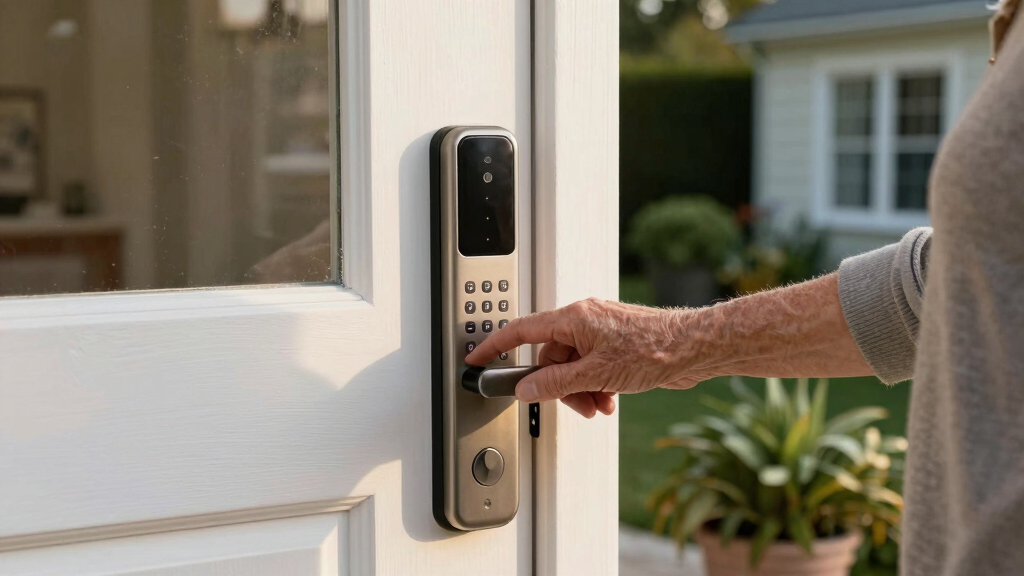

Choosing the best smart lock for seniors involves balancing ease of use, security, and reliability. The ULTRALOQ Bolt SE stands out for its seamless app control and compatibility, making it ideal for tech-savvy seniors. The Philips Wi-Fi Smart Lock offers straightforward keyless entry with voice control, perfect for those who prefer simplicity. However, many options compromise between advanced features and user-friendliness, which can be overwhelming or insufficient. Keep reading for a detailed review of the top choices and what makes each one suitable for seniors.

Turn quiet afternoons into listening time
- Thousands of audiobooks, podcasts and originals
- Listen on your phone, tablet or Echo — also offline
- Cancel anytime
Key Takeaways
- Ease of use and reliable connectivity are the most critical factors for seniors choosing smart locks.
- Models with keyless entry methods, like fingerprint or keypad, tend to be more accessible for seniors with limited mobility or memory issues.
- Locks with integrated voice control or remote management simplify access for caregivers and family members.
- Higher-priced options often include better build quality and more advanced security features, but simpler models can be just as effective for basic needs.
- Compatibility with existing smart home systems varies, so choosing a lock that works with your current setup can reduce frustration.


More Details on Our Top Picks
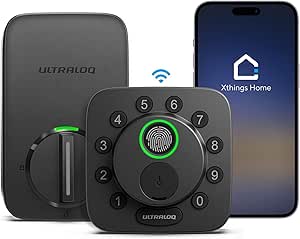
ULTRALOQ Bolt SE Smart Lock with Wi-Fi and Matter Compatibility
The ULTRALOQ Bolt SE stands out by offering a wide range of access methods, including fingerprint, passcodes, app, voice control, and mechanical keys, making it highly adaptable for different seniors’ needs. Its seamless compatibility with Apple Home, Alexa, Google, and Matter ecosystems simplifies integration into existing smart setups, unlike some locks that require separate hubs. The long battery life of up to 18 months reduces maintenance concerns, especially for less tech-savvy users. However, the setup process can be complex for those unfamiliar with smart devices, and it relies on a Wi-Fi 2.4GHz network, which might be an issue in some homes. The absence of a door sensor limits its ability to detect open/closed status without additional accessories. Compared with simpler locks, this model offers more automation but demands a bit more initial effort to install and configure.
Pros:- Multiple access options including fingerprint, passcodes, app, and voice control
- Remote management and real-time notifications via app
- Seamless Matter ecosystem integration for smart home automation
- Battery life of up to 18 months reduces maintenance
Cons:- Requires Wi-Fi 2.4GHz network, no hub needed
- Setup may be complex for less tech-savvy users
- Door sensor not included, limiting open/close detection
Best for: Seniors who want a highly adaptable, smart home-compatible lock with multiple access options and long battery life.
Not ideal for: Users seeking a straightforward, plug-and-play lock with minimal setup or those without a Wi-Fi network setup.
- Model Number:ULTRALOQ BOLT SE
- UPC:850056978682
- Recommended Uses:front door, back door, garage, rentals, Airbnb
- Battery Life:18 months
- Warranty:Lifetime mechanical, 18 months electronic
- Connectivity:Wi-Fi 2.4GHz, Matter over Thread
Bottom line: This pick is ideal for seniors who want a versatile, smartly integrated lock with long-lasting batteries and multiple access methods.
Philips Wi-Fi Smart Lock Keyless Entry Deadbolt for Front Door
The Philips Wi-Fi Smart Lock is tailored for those seeking a straightforward, reliable lock that combines multiple unlocking methods—app, fingerprint, passcode, and voice—without the need for a hub. Unlike the ULTRALOQ Bolt SE, it’s designed for quick installation on standard doors, making it accessible for seniors comfortable with DIY projects. Its auto-lock feature adds convenience, while remote control and real-time notifications boost security. However, it depends on a 2.4GHz Wi-Fi network, and batteries are not included, meaning additional purchases are necessary. It lacks a door sensor, so users don’t get automatic open/close detection, which might be a drawback for those prioritizing comprehensive monitoring. This model is best suited for those who want a simple, reliable lock with smart features that don’t require extensive setup.
Pros:- Easy DIY installation on most standard doors
- Multiple unlocking methods including app, fingerprint, passcode, and voice
- Auto-lock feature for added convenience
- Remote access and real-time alerts
Cons:- Requires 2.4GHz Wi-Fi, no 5GHz support
- Batteries not included, additional purchase needed
- No door sensor for open/close detection
Best for: Seniors who want an easy-to-install, reliable smart lock with essential features and minimal fuss.
Not ideal for: Tech enthusiasts looking for advanced automation or integrated ecosystems, since it lacks compatibility with Matter or extensive smart home systems.
- Compatibility:Most doors 1-3/8″ to 2″ thick
- Wi-Fi:Built-in 2.4GHz Wi-Fi
- Power:4 or 8 AA alkaline batteries (not included)
- Connectivity:Remote control via smartphone, voice control via Alexa/Google
- Auto Lock:Yes, adjustable from 10 to 180 seconds
- Security Mode:Away Mode disables all unlock methods
Bottom line: This lock makes sense for seniors seeking a straightforward, easy-to-install smart lock with essential features and reliable performance.
Bluetooth Fingerprint Smart Lock with Handle & Keypad – Fits Most US Doors, DIY Install, Keyless Entry: Code, FOB, Auto-Lock, Alexa & Google Compatible
This model stands out for its flexible unlocking options, including fingerprint, keypad, FOB, app, and physical key, offering comprehensive convenience for seniors who prefer multiple methods. Compared with the Philips WiFi Keypad Lock, this lock provides more unlocking options and is easier to install without extra hardware, but it does require a gateway for voice assistant integration and may need frequent battery replacements. Its DIY installation appeals to those who want straightforward setup, and voice compatibility adds modern control, yet initial setup can be complex for less tech-savvy users. Overall, this lock is best suited for seniors who value flexibility and don’t mind occasional maintenance.
Pros:- Multiple unlocking methods for maximum convenience
- Easy DIY installation without drilling
- Compatible with Alexa and Google for voice control
Cons:- Requires a gateway for voice assistant functions
- Battery life may necessitate frequent replacements
- Some users report initial setup complexity
Best for: Seniors who want a highly versatile, easy-to-install lock with multiple unlocking methods and voice assistant compatibility.
Not ideal for: Seniors uncomfortable with configuring gateways or those seeking a low-maintenance, straightforward lock without ongoing battery concerns.
- Product Type:LOCK
- Model Number:samtechT S
- UPC:767501154648
- Recommended Uses:Front door, Home, Apartment, Airbnb, Rental property, Kids room, Seniors’ home, Office entry, Garage door, Vacation home, Basement door
- Included Components:Mounting Plate, Rubber Gasket, Face Plate, Back Plate, Bolt Assembly
- Item Dimensions:7 x 3 x 1.12 inches
- Item Weight:3.6 Pounds
- Warranty & Support:30-Day Return Guarantee, Product Warranty
Bottom line: This pick suits seniors who prioritize flexibility and smart home integration, accepting some setup challenges.
Philips WiFi Keypad Door Lock with Handle, Built-in WiFi, APP Remote Control, Voice & Fingerprint Unlock, Keyless Entry Deadbolt
This lock excels in remote control and real-time access monitoring via its built-in WiFi, making it ideal for tech-savvy seniors or caregivers managing multiple users. Compared to the Philips Wi-Fi Smart Lock with Handles, this model offers a complete handle set for enhanced security, but it may require drilling and proper door thickness for installation, and auto-locking only works if the door is fully closed, which could be a concern for some users. Its multiple unlocking options, including fingerprint and app control, support diverse needs, while the WiFi ensures you stay connected from anywhere. It’s a strong choice for those who want high security and easy remote management, even if installation might be more involved.
Pros:- Remote control via built-in WiFi and app
- Multiple unlocking options including fingerprint, PIN, and key
- Auto locking enhances security
Cons:- Requires door to be fully closed for auto lock
- Installation may require drilling and door compatibility
- No built-in sensor for door status detection
Best for: Seniors or caregivers who need remote access control and real-time monitoring for multiple users or rental properties.
Not ideal for: Seniors who prefer simple, no-drill installation or lack a fully closed door for auto-lock to function properly.
- WiFi Compatibility:2.4GHz WiFi, no hub needed
- Unlock Methods:Fingerprint, keypad PIN, app remote control, voice commands
- Auto Lock Timer:0-180 seconds
- Fingerprint Speed:0.3 seconds
- Door Thickness Compatibility:1-3/8″ to 1-3/4″
- Batteries:8 AA alkaline batteries (not included)
Bottom line: Best suited for seniors seeking remote management and high security, with some installation considerations.
Philips Wi-Fi Smart Lock with Handles, Keyless Entry Front Door Lock Set, Keypad Deadbolt with Handle, App, Fingerprint, Code Unlocking, Auto Locking, Built-in WiFi, Remote Control & Voice Unlock
This model offers a comprehensive package with handles, keypad, fingerprint, and app control, making it ideal for seniors who want an all-in-one solution. Its built-in Wi-Fi enables remote management and voice control with Alexa and Google, providing peace of mind for those managing a household or rental unit. Compared to other locks, its installation may require drilling and compatibility checks, and auto-locking only functions if the door is fully closed. However, its multiple unlocking options and remote capabilities make it user-friendly for seniors who prefer control from afar. This lock is best for those who want a robust, all-encompassing security setup, accepting some installation effort.
Pros:- Multiple unlocking options including fingerprint, PIN, key, and app
- Built-in WiFi for remote management and voice control
- Includes handles for a complete front door solution
Cons:- Requires drilling and compatibility checks for installation
- Auto lock only functions if door is fully closed
- Installation may be more involved than simpler models
Best for: Seniors or homeowners who want a versatile, remote-controllable lock with multiple unlocking options and integrated handles.
Not ideal for: Seniors with limited DIY skills or those with unique door configurations that complicate installation.
- Brand:Philips
- Model Number:DDL240X-1HW-L
- Recommended Uses:Exterior Door, Home Security
- Included Components:2 Door Handles, AA Batteries x8, Mounting Screws & Hardware, WiFi Smart Lock, User Manual
- UPC:850071183511
- Best Sellers Rank:#6,160 in Tools & Home Improvement, #38 in Deadbolts
Bottom line: Ideal for seniors wanting an all-in-one, remote-controlled lock with multiple access methods and handles for style and security.
Fingerprint Smart Deadbolt with Keypad – Keyless Entry Lock for Home, Apartment, Office, Airbnb, Rental
This deadbolt offers a straightforward, reliable keyless entry system with fingerprint, keypad, app, and physical key options. Compared with the other Philips locks, this model focuses on simplicity and ease of installation, making it suitable for seniors who want a no-fuss upgrade. While it supports over 100 fingerprints and codes, the need for a separate gateway for remote app control can be a hassle for some users, and its limited capacity might not cover very large households. Its auto-lock and privacy modes enhance security, but occasional connectivity issues with the app have been reported. Overall, this lock suits seniors managing rentals or seeking a dependable, easy-to-use smart lock.
Pros:- Supports multiple unlocking methods including fingerprint, keypad, app, and key
- Easy to install without professional help
- Auto-lock and privacy modes increase security
Cons:- Gateway needed for remote app control
- Limited to 100+ fingerprints and codes
- Occasional connectivity issues with app control
Best for: Seniors managing rental properties or households with moderate user counts who want simplicity and straightforward security.
Not ideal for: Seniors with very large households or those who require constant remote access without extra hardware.
- Product Type:LOCK
- Brand:Sifely
- Model Number:Sifely Model O Deadbolt
- Recommended Uses:Front Door Security, Rental Property, Airbnb, Home Office, Kids & Seniors Safety
- Item Dimensions:6.3 x 2.6 x 1.9 inches
- Item Weight:2 Pounds
- Number of Fingerprints Supported:100+
- Number of Codes Supported:100+
Bottom line: Best for seniors who prioritize simplicity, reliability, and moderate user management, accepting some extra hardware for remote features.
eufy Security Smart Lock C220, Fingerprint Keyless Entry Door Lock with Wi-Fi, App Control, Deadbolt, IP53 Waterproof, BHMA Grade 3
The eufy Security Smart Lock C220 stands out for its versatility, offering fingerprint recognition, app control, keypad entry, physical key, and voice assistant compatibility. Compared with the ULTRALOQ Bolt SE, which also provides multiple unlock methods, the C220’s standout feature is its straightforward 15-minute installation that doesn’t require drilling, making it especially accessible for seniors less comfortable with complex setups. Its 8-month battery life and IP53 waterproof rating ensure reliable outdoor operation, though the battery life can vary with frequent use, and remote access depends on Wi-Fi stability. The BHMA Grade 3 rating reflects decent security but falls short of higher-grade locks for more aggressive security needs. This pick makes the most sense for seniors prioritizing ease, outdoor resilience, and multiple unlock options.
Pros:- Long-lasting 8-month battery life reduces frequent replacements
- Multiple unlocking options including fingerprint, app, keypad, and voice commands
- Easy 15-minute installation without drilling needed for most doors
- IP53 waterproof rating ensures outdoor resilience
Cons:- Battery life may decrease with frequent use or heavy activity
- Requires Wi-Fi connection for remote access, which could be unstable
- BHMA Grade 3 offers moderate security, less than higher-grade locks
Best for: Seniors seeking a reliable, easy-to-install lock with multiple unlocking methods and outdoor durability.
Not ideal for: Users who need the highest security ratings or do not have a stable Wi-Fi connection for remote control.
- Battery Life:8 months
- Battery Type:8 AA batteries
- Connectivity:Wi-Fi
- Unlock Methods:Fingerprint, App, Keypad, Physical Key, Apple Watch, Alexa, Google Assistant
- Waterproof Rating:IP53
- Operating Temperature:-22℉ to 158℉ (-30℃ to 70℃)
- BHMA Grade:3
- Dimensions:7.67 x 4.49 x 4.41 inches
Bottom line: This lock is ideal for seniors who want straightforward, versatile, and weather-resistant security without complex installation.

How We Picked
Our evaluation focused on factors most relevant to seniors: ease of installation, straightforward operation, and dependable connectivity. We prioritized products with simple access methods such as fingerprint, keypad, or app-based controls that minimize frustration. Build quality and security features also weighed heavily, along with compatibility with voice assistants like Alexa and Google Assistant for hands-free operation. We aimed to highlight options that balance affordability with reliability, ranking them according to usability, security, and overall value for seniors and their caregivers.
Factors to Consider When Choosing Best Smart Locks For Seniors
When selecting a smart lock for seniors, it’s essential to consider factors that affect daily usability and peace of mind. The right lock should be simple to operate, require minimal maintenance, and offer dependable security. Understanding key features and potential tradeoffs can help you make an informed decision that balances convenience with safety.
Ease of Use and Accessibility
For seniors, a lock with intuitive controls—such as a keypad with large buttons, fingerprint recognition, or a straightforward app—is vital. Avoid overly complicated interfaces or multiple app steps, which can cause frustration. Voice control compatibility adds convenience, especially for those with mobility issues, but ensure it is reliable and easy to set up. Prioritize locks that require minimal physical effort to operate, like auto-lock features or keyless entry.
Connectivity and App Control
Reliable Wi-Fi or Bluetooth connection is essential for remote management. Look for models that maintain a stable connection without frequent drops, as this affects daily access and security. App interfaces should be simple, with clear instructions and minimal setup. Consider how often you’ll need to update firmware or troubleshoot, and opt for brands with responsive customer support and regular updates.
Security Features
Security remains paramount, so check for features like tamper alerts, encryption, and sturdy build materials. Some locks include activity logs, which can help monitor who entered and when—valuable for caregivers. Avoid overly complex locks that might be difficult for seniors to use or maintain, but don’t compromise on core security features for simplicity.
Compatibility and Integration
Consider whether the lock integrates with your existing smart home ecosystem, such as Alexa, Google Assistant, or Apple HomeKit. Compatibility can streamline daily routines and allow remote access for family or caregivers. However, ensure that integration doesn’t add unnecessary complexity or require frequent troubleshooting, especially if the primary user isn’t tech-savvy.
Price and Maintenance
Smart locks vary widely in price, often reflecting features and build quality. While investing in a more durable, feature-rich lock can provide peace of mind, many affordable options deliver sufficient security for most seniors. Keep in mind ongoing maintenance—batteries, firmware updates, and occasional troubleshooting—and choose a model with accessible support and easy battery replacement.
Frequently Asked Questions
Are smart locks safe for seniors who are not tech-savvy?
Yes, many smart locks are designed with simplicity in mind, featuring keypads, fingerprint scanners, or remote controls that do not require extensive technical knowledge. Models with large buttons, clear instructions, and minimal app dependency are especially suitable. For seniors uncomfortable with technology, locks with physical key backups provide additional peace of mind, ensuring access even if digital features fail.
Can caregivers control smart locks remotely for seniors?
Absolutely, most smart locks offer remote access via smartphone apps, allowing caregivers to lock or unlock doors from anywhere. This feature is particularly useful for managing visitors or emergencies. However, it’s important to ensure a stable Wi-Fi connection and to set permissions carefully to prevent accidental or unauthorized access. Regularly updating passwords and firmware enhances security for remote control capabilities.
Which type of lock is easiest for seniors to operate daily?
Locks with keyless entry methods such as fingerprint scanners or keypad codes tend to be easiest, as they eliminate the need for physical keys or complex app interactions. Fingerprint recognition offers quick access with minimal effort, while keypad codes are simple to memorize. Locks with auto-lock features also reduce the need for manual locking, adding convenience for seniors who might forget or struggle with traditional keys.
Do smart locks require frequent maintenance or updates?
Most smart locks require occasional battery replacements, which are generally straightforward. Firmware updates are less frequent but improve security and functionality; many locks notify you when updates are available. Choosing models with long-lasting batteries and clear maintenance instructions can minimize hassle. Proper installation and regular checks help ensure the lock remains reliable over time.
Are more expensive smart locks worth the extra investment?
Higher-priced locks often offer better durability, more advanced security features, and seamless integration. For seniors with specific needs—such as enhanced security, remote management, or voice control—the extra cost can translate into increased peace of mind and convenience. However, for basic needs, budget-friendly options that focus on ease of use and reliability can be equally effective, making it essential to match features with actual requirements.
Conclusion
For seniors who prioritize straightforward operation and reliable security, the ULTRALOQ Bolt SE stands out as the best overall choice due to its combination of app control, fingerprint access, and ease of installation. Caregivers seeking remote management capabilities may find the Philips Wi-Fi Smart Lock ideal for its seamless integration and voice control. Those on a budget or new to smart technology should consider simpler keypad models that still deliver dependable security without overwhelming features. For more tech-savvy seniors or households with advanced smart home setups, premium options offering extensive integration and automation could be worth the investment.
Halloween Picks

HOPOCO Halloween Pumpkin Fog Machine with 12 LED Colors & Remote Control

JOYIN 5-Foot Halloween Animatronic Drinking Skeleton

12.5-Foot Lighted Halloween Inflatable Archway
As an affiliate, we earn on qualifying purchases.