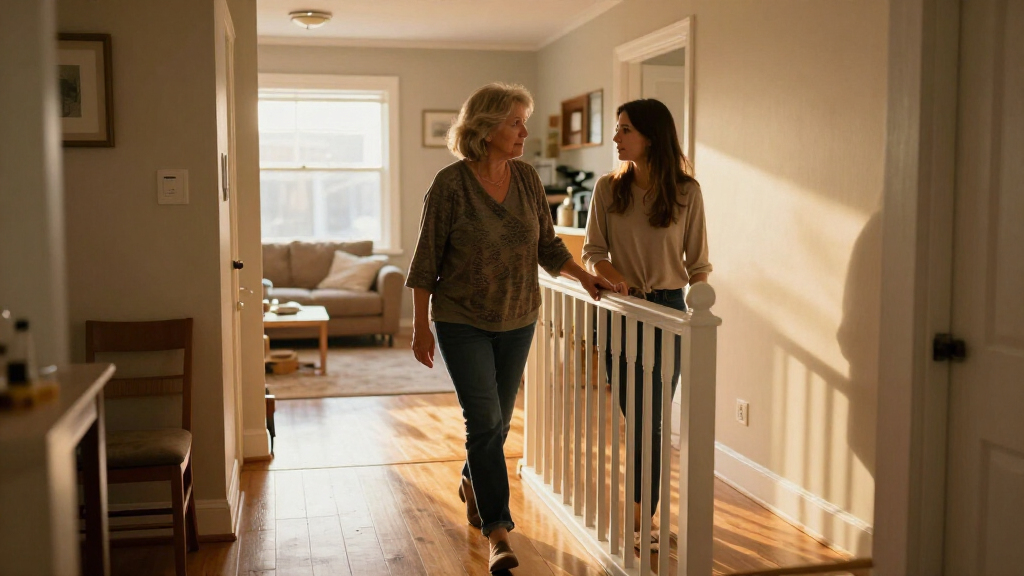
This checklist is for families and caregivers making everyday spaces easier to navigate for someone living with dementia. The goal is to support familiar routines and reduce avoidable confusion while keeping the person’s abilities, preferences, and safety needs at the center. Individual needs vary, so consider changes together with the person and their care team.

Turn quiet afternoons into listening time
- Thousands of audiobooks, podcasts and originals
- Listen on your phone, tablet or Echo — also offline
- Cancel anytime
The sections follow practical home needs: keeping track of time, organizing medication, limiting access to stove controls, noticing an open door, identifying household items, and lighting nighttime paths. Some slots offer general guidance without a named product; others feature the product listed for that category. Each choice addresses a specific task, rather than serving as a complete home-safety solution.
Use the look-for points to compare options with the actual room, routine, and person in mind. Check setup requirements and compatibility before buying, and consider whether the person can use the item comfortably and consistently. Test changes together and revisit them as needs change; a device that helps one person may not suit another.
Large-Display Digital Clock
A clearly readable clock can help make the day’s schedule easier to follow, especially when a person has trouble distinguishing morning from evening or remembering the date. Choose a display that can be read from the usual chair or bed, with simple wording and a layout that feels familiar. Clear, familiar information matters more than extra functions if those functions make the screen harder to interpret. No specific product is named for this slot, so compare options against the person’s eyesight and preferred room placement. A common mistake is choosing a display that looks large in a product photo but is difficult to read from across the room, or one whose bright light or changing display is distracting. Check the actual display dimensions, viewing angle, contrast, and whether the time format is easy to understand. Consider whether the clock needs to show the day and date, and whether those labels are plainly written. Confirm power needs and how settings are restored after an outage. Place it consistently where it can be seen during the routine it is meant to support, then check that the display remains legible in both daytime and nighttime lighting.What to look for:
- Large, high-contrast characters readable from the intended viewing spot
- Plain labels for time and, if needed, day and date
- A display layout that avoids distracting extra information
- Power and backup details that suit the room
- A stable placement with a clear view from bed or a favorite seat
Automatic Pill Dispenser
Medication routines can involve many small steps, and a dispenser may help organize doses and provide reminders. The listed pick is the 42-Day Automatic Pill Dispenser with Expandable 3-Tray Organizer. Consider how its capacity and expandable trays fit the person’s actual medication schedule, who will fill it, and who will respond if a dose is missed. Caregiver involvement is important when the person cannot reliably load, set, or troubleshoot the device alone. Confirm the dispenser’s instructions with a pharmacist or care professional before changing any medication routine. A common mistake is assuming that an automatic dispenser independently confirms a dose was taken or works for every pill shape and schedule. Check how loading, locking, alerts, and missed-dose handling work, and whether the person can hear or see its prompts. Verify that the medication plan fits the device’s compartments and that a responsible person can refill it on time. Consider placement where the user can reach it safely, without confusing it with other containers. Confirm compatibility with the device instructions and the care team, particularly for medication that must be handled in a specific way. Make a backup plan for power interruption, travel, or a device alert that goes unanswered.What to look for:
- Compatibility with the person’s medication schedule and pill types
- Clear instructions for loading, locking, and setting alerts
- Prompts that the user can hear or see
- A refill routine assigned to a responsible person
- A practical backup plan for missed alerts or power interruption
42-Day Automatic Pill Dispenser with Expandable 3-Tray Organizer

This pill dispenser offers app-based or on-device setup with voice guidance, dose tracking, and alerts for scheduled or missed medication. Its three trays provide 42 slots, with a sealed lid and desiccant to help keep pills dry, while a digital lock helps prevent accidental access.
Pros:
- Can be configured and monitored remotely through the app
- Offers multiple alert types and voice-guided setup
- Digital lock helps prevent accidental access
- Sealed storage and a desiccant pack help protect pills from moisture
Cons:
- Not suitable for assisted living facilities, nursing homes, or other regulated institutions
- The stated dosing capacities for twice- and three-times-daily schedules are unclear
Best for: Households seeking an organized dispenser with expandable trays
Not ideal for: People whose medication schedule does not fit the device or needs direct supervision
Bottom line: Check the schedule and loading instructions with a pharmacist or care professional before relying on the dispenser.
Stove Knob Covers
Stove controls can be hard to distinguish, and accidental use may create a safety concern. The listed pick is the Mom’s Choice Award Stove Knob Locks 5-Pack Silicone Child Safety Lock. Before choosing covers, identify the exact stove model and knob style; covers must fit and function as intended on that appliance. Appliance compatibility is essential, and a cover should not obstruct access when an authorized adult needs to cook. Consider the person’s dexterity and whether a visible barrier could cause confusion or frustration. A common mistake is assuming a universal-looking cover fits every knob or reliably prevents use. Compare the product’s compatibility guidance with the stove’s controls, and follow installation instructions. Check whether the covers can be removed without tools when needed and whether the material tolerates the appliance’s location and conditions as described by the manufacturer. These covers do not replace supervision or broader planning around cooking. Keep cooking routines safe by deciding who operates the stove and by considering alternatives if the person may try to remove or bypass the covers. Recheck fit after installation and whenever the appliance or knobs are changed.What to look for:
- Explicit compatibility with the stove’s knob shape and dimensions
- Installation and removal instructions that suit the household
- A design that does not block authorized use
- Clear manufacturer guidance for placement and conditions
- A broader cooking-safety plan alongside the covers
Mom’s Choice Award Stove Knob Locks 5-Pack Silicone Child Safety Lock Set

This set of five silicone stove knob locks is designed to prevent curious children and pets from turning on burners, ensuring kitchen safety. Made from heat-resistant, BPA-free silicone, these locks are easy to install, durable, and dishwasher safe, blending seamlessly into any kitchen decor.
Pros:
- Easy to install without tools
- Made from durable, heat-resistant silicone
- Safe, BPA-free, and dishwasher safe
- Stylish colors to match kitchen decor
Cons:
- Requires performing the Quarter-Coin Knob Gap Test for proper fit
- May need adjustment if knob spacing is tight
- Designed primarily for push-turn knobs, may not fit all stove types
Best for: Households looking to add a barrier to compatible stove knobs
Not ideal for: Stoves with incompatible controls or situations requiring unsupervised cooking access
Bottom line: Verify the stove’s knob compatibility and plan who will operate the appliance.
Door Alarm Sensor
A door alert may help a caregiver notice when a monitored door has opened. The listed pick is the Doorsound WiFi Freezer & Refrigerator Door Alarm – Text & App Notifica. Its name indicates WiFi, text, and app notifications, but the product details provided here do not establish setup requirements or compatibility. Check the actual alert path before relying on it: who receives notifications, on which device, and what happens if the network or phone is unavailable. Decide which door needs monitoring and whether an alert would be useful at that location. A common mistake is assuming a door alarm is a complete safety system or that app notifications will always be noticed. Read the product’s instructions for WiFi requirements, sensor placement, supported devices, notification setup, and alert behavior. Consider whether the sensor can be installed securely on the chosen door and frame and whether opening and closing the door could dislodge it. Make a response plan so alerts reach someone able to act. Test the full setup with the caregiver’s phone and the actual door, then repeat checks after network or device changes. Do not treat an alert as a substitute for appropriate supervision or a broader care plan.What to look for:
- Documented WiFi and phone compatibility requirements
- Instructions for sensor placement on the intended door
- A clear explanation of text and app alert behavior
- A named caregiver responsible for receiving and responding
- A way to test alerts and plan for network interruptions
Doorsound WiFi Freezer & Refrigerator Door Alarm – Text & App Notifications, Adj

The Doorsound WiFi Door Alarm alerts you when a refrigerator or freezer door is left open through loud alarms, text messages, app notifications, and Alexa announcements. It is suitable for garages, basements, and secondary refrigerators, with customizable alert settings and WiFi connectivity for remote notifications.
Pros:
- Provides multiple notification options including app alerts, texts, and Alexa announcements.
- Customizable alert delay and volume settings for tailored use.
- Compatible with various door types and designed for wide gaps and misalignment.
- No subscription required for push notifications.
Cons:
- Requires WiFi (2.4 GHz) for operation.
- Battery-powered, so regular battery replacements are needed.
- Limited to US-based support and smart home integrations.
Best for: Caregivers who want app and text alerts for a monitored door
Not ideal for: Households without reliable connectivity or someone assigned to respond
Bottom line: Confirm setup requirements and test notifications before using the sensor as part of a safety plan.
Picture Label Stickers
Picture labels can make storage locations easier to recognize when written words are difficult to process. This slot has no named product, so choose stickers that match the household’s objects and the person’s familiar vocabulary. Use one clear image for each location or item, and place it where the person naturally looks when searching. Familiar pictures are more useful than a generic icon if the image does not resemble the item or place being labeled. Involve the person when possible so the labels support their own habits rather than imposing a new system. A common mistake is labeling too many things at once, using small images, or adding words and symbols that compete for attention. Start with a few frequently used cupboards, drawers, or containers and observe whether the labels help. Check image size, contrast, adhesive suitability, and whether the label can be cleaned or replaced as needed. Avoid placing labels where they could be mistaken for instructions or obscure important information. Keep labels consistent across related locations, and adjust them if the person’s understanding or routine changes. Make sure all household members use the same names for labeled places so the cues reinforce, rather than confuse, daily routines.What to look for:
- Large, recognizable pictures that match the labeled item or location
- Strong contrast and placement at the point of use
- Adhesive and surface compatibility for the intended location
- A small initial set focused on frequently used places
- Consistent images and names across related storage areas
Motion Sensor Night Lights
A light that switches on as someone moves through a room may make nighttime paths easier to see without searching for a switch. The listed pick is the L LOHAS LED Motion Sensor Night Light (2 Pack), Plug-In Wall Night Lig. Check the product instructions for its sensing behavior, outlet requirements, and placement guidance before deciding where to use it. Path placement matters: consider the route from bed to bathroom and whether outlets are available where light will be useful without creating an obstruction. A common mistake is focusing only on brightness and overlooking glare, shadows, or whether the sensor responds from the approach direction. Compare the light’s settings and sensing range with the room, and consider the person’s vision and comfort with darkness. Make sure the plug does not block an outlet that is needed for another device, and avoid locations where furniture or doors might interfere with the light. Try the route at night to see whether the lights activate in time and illuminate the floor without shining directly into the person’s eyes. Reassess after furniture moves or routines change, and use suitable lighting alongside other fall-prevention measures.What to look for:
- Manufacturer guidance for sensing range and activation behavior
- Light settings suited to the person’s vision and comfort
- Outlets positioned along the intended walking route
- Placement that avoids glare, shadows, and blocked outlets
- A nighttime trial along the full route from bed
L LOHAS LED Motion Sensor Night Light (2 Pack), Plug-In Wall Night Light
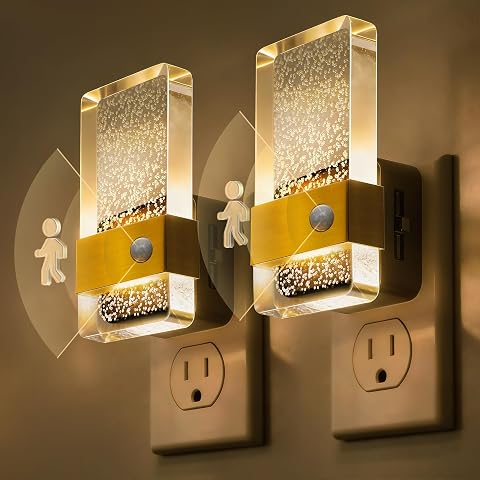
This 2-pack of plug-in LED night lights features both motion and dusk-to-dawn sensing, with an ‘ON’ mode for continuous nighttime lighting and an ‘AUTO’ mode that turns off after 60 seconds of inactivity for energy savings. The dimmable design (0-100LM) delivers soft 3000K glare-free light through a durable acrylic housing with a golden square ring accent.
Pros:
- Dual sensing modes (dusk-to-dawn and motion-activated) for flexible use
- Dimmable brightness from 0 to 100 lumens
- Durable acrylic construction with elegant gold accent design
- Soft, glare-free 3000K light that is easy on the eyes
Cons:
- Not waterproof, limiting outdoor use
- Motion mode may not suit those needing constant illumination without using ON mode
Best for: People who need light along a familiar nighttime walking path
Not ideal for: Rooms without suitable outlets or where light activation may disturb sleep
Bottom line: Test placement on the actual route and adjust for visibility, comfort, and outlet access.
When planning purchases, start with the need that has the clearest safety or daily-routine impact, then address medication organization and nighttime visibility. Add time displays, door alerts, stove barriers, or picture cues according to the person’s specific challenges and the home’s layout. Prioritize fit and routine: an item is useful when it works in the real setting and someone can maintain it.
Make changes gradually, explain them in familiar terms, and notice whether they help the person feel more comfortable and independent. Ask the care team to weigh in when a change affects medication or supervision, and revisit the setup as abilities and routines evolve. Small, thoughtful adjustments can make familiar tasks easier to approach, one room and routine at a time.
Fall Picks
fall essentials
As an affiliate, we earn on qualifying purchases.