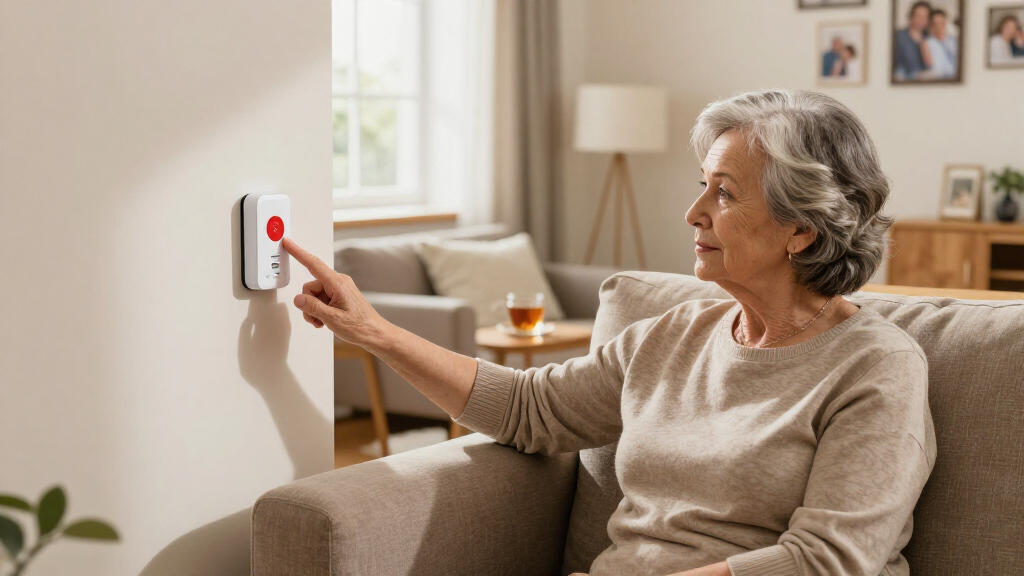

This guide walks through the process of installing and using straightforward emergency alert systems suitable for homes, small businesses, or community groups. It is designed for beginners with no prior experience, aiming to help you set up a reliable alert method that works instantly when needed. By following these steps, you’ll be able to notify others efficiently during emergencies, ensuring safety and quick response.

Turn quiet afternoons into listening time
- Thousands of audiobooks, podcasts and originals
- Listen on your phone, tablet or Echo — also offline
- Cancel anytime

CallToU Caregiver Pager with 2 Wireless Call Buttons for Elderly at Home
- ✔ Power Source: Battery Powered
- ✔ Batteries: 2 x 12V alkaline batteries (included)
- ✔ Maximum Range: 500 feet
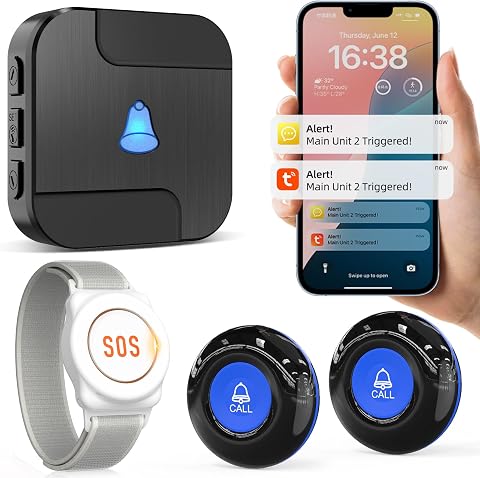
CallToU Wi-Fi Caregiver Call Button Emergency Alert System for Seniors
- ✔ Power Source: 2 AAA batteries (included)
- ✔ Compatible Devices: Smartphone, Tablet
- ✔ Maximum Range: 328 feet

Wireless Caregiver Pager SOS Call Button for Elderly Monitoring
- ✔ Range: 1000 feet
- ✔ Waterproof: Yes
- ✔ Music Tones: 55
Difficulty: Beginner | Time: 30-60 minutes
What You’ll Need
Tools & Materials:
- Emergency alert system device (e.g., siren alarm, wireless alert system, or push notification system)
- Power source (batteries or electrical outlet)
- Smartphone or computer for setup
- Wi-Fi or internet connection (if applicable)
Knowledge:
- Basic understanding of household or office electronics
- Ability to follow step-by-step setup instructions
Ensure your alert device has fresh batteries or is connected to a reliable power source before starting setup. Confirm your internet connection is stable if the system uses wireless notifications.
CallToU Caregiver Pager with 2 Wireless Call Buttons for Elderly at Home
This system stands out for its impressive 500+ foot wireless range, making it ideal for larger homes or multi-room setups. Its waterproof and dustproof design ensures durability, while adjustable volume and multiple ringtones allow for customization to different users. Compared with other options, it does not rely on Wi-Fi, offering a straightforward, plug-and-play solution. However, it’s limited to indoor environments, and the receiver must be plugged into an outlet, which could be inconvenient in some locations.
Pros:
- Long 500+ foot wireless range for flexible use around the home
- Adjustable volume and multiple ringtones for personalized alerts
- Waterproof and dustproof design enhances durability
- Easy to carry with neck strap or brackets
Cons:
- Requires plugging into an electrical outlet
- Limited to indoor use
- Battery replacement needed over time
Best for: Home caregivers needing reliable, long-range alerts without Wi-Fi dependency
Not ideal for: Outdoor environments or users seeking a wireless system with app notifications
Bottom line: A reliable, straightforward choice for indoor home alerts with excellent range and durability.
“A reliable, straightforward choice for indoor home alerts with excellent range and durability.”
CallToU Wi-Fi Caregiver Call Button Emergency Alert System for Seniors
This system offers a wireless call button with a 328-foot range that connects to a Wi-Fi-enabled receiver. Its advantage lies in app notifications and alert sharing among multiple family members, making it suitable for tech-savvy caregivers. Customizable ringtones and multiple volume levels provide flexibility, and it supports fall detection. However, it depends on stable Wi-Fi and a subscription for advanced notifications, which could complicate setup and incur ongoing costs. It’s better suited for those already comfortable with smart home devices.
Pros:
- Long wireless range with penetrating walls
- Customizable ringtones and alert sharing
- Supports multiple volume levels and fall detection
- Integrates with smartphones and tablets
Cons:
- Requires 2.4GHz Wi-Fi, not 5G
- Subscription needed for some features
- Limited to specific app compatibility
Best for: Caregivers comfortable with Wi-Fi and app-based alerts, looking for sharing capabilities
Not ideal for: Users without reliable Wi-Fi or those preferring a purely physical alert system
Bottom line: Ideal for tech-savvy users wanting flexible, shareable alerts within a connected home environment.
“Ideal for tech-savvy users wanting flexible, shareable alerts within a connected home environment.”
Wireless Caregiver Pager SOS Call Button for Elderly Monitoring
This model provides the longest operational range at 1000 feet, making it perfect for outdoor use or large properties. Its easy setup involves placing the waterproof transmitter and receiver in strategic locations, and its expandability allows adding multiple transmitters or receivers. The multiple ringtones and adjustable volume cater to different needs, but it requires manual placement and setup, which might be challenging in complex environments. Additionally, there’s no detailed info on battery life, so ongoing maintenance could be a concern.
Pros:
- Longest range at 1000 feet for outdoor or large areas
- Multiple ringtones and 5 adjustable volume levels
- Waterproof and dustproof for durability
- Expandable with additional transmitters
Cons:
- Requires manual setup and strategic placement
- Limited indoor coverage if obstacles are present
- No info on battery life or replacement process
Best for: Outdoor caregivers or those with large properties needing reliable alerts over long distances
Not ideal for: Indoor-only environments or users preferring Wi-Fi or app-based systems
Bottom line: Best suited for outdoor or sprawling environments where long-distance alerts are essential.
“Best suited for outdoor or sprawling environments where long-distance alerts are essential.”
As an Amazon Associate we earn from qualifying purchases.
Before You Start
Ensure you have all the tools listed and a quiet, organized workspace. Read through the entire setup instructions to familiarize yourself with the steps. Check that your alert device is compatible with your power sources and internet setup. If setting up in a shared environment, inform others about the system to prevent accidental activation or confusion.Step-by-Step Instructions
Step 1: Choose the right alert system
Select an emergency alert device suitable for your needs. Options include loud siren alarms, wireless notification systems, or mobile app-based alert services. Consider the environment: for loud, physical alerts, a siren might be best; for remote notifications, a smartphone app works well.
Tip: Opt for devices with loud volume, clear visual indicators, and easy activation features. Check user reviews for reliability.
Check: You have selected a device that fits your environment and needs, with clear instructions for setup and activation.
Step 2: Install the alert device
Follow the manufacturer’s instructions to physically install the device. If it’s a siren, mount it on a wall or ceiling at a central location. For wireless systems, ensure it’s placed within Wi-Fi range. Connect the power source correctly, inserting batteries or plugging into an outlet.
Tip: Place the device where it is visible and audible from most areas, avoiding obstructions.
Check: The device is securely mounted with power connected, and you can hear or see initial indicators (like lights or sounds).
Step 3: Configure system settings
Power on the device and follow the setup instructions to connect it to your Wi-Fi network or pairing with your smartphone. Download any required apps and create an account if needed. Set alert tones, volume levels, and visual indicators according to your preference.
Tip: Use strong, unique passwords for device accounts and ensure firmware is updated during setup.
Check: The device successfully connects to your network/app, and test signals or notifications are received correctly.
Step 4: Test the alert system
Activate the alert system using the designated method—press the test button or trigger a test alert via the app. Verify that the alert is loud and clear, and visual indicators activate as intended. Confirm that notifications are received on all designated devices.
Tip: Perform multiple tests at different times to ensure consistent operation.
Check: The alert activates fully, audible and visual signals work properly, and notifications are received on your smartphone or other devices.
Step 5: Train all users
Show everyone how to activate the alert system. Practice triggering the alert and responding appropriately. Explain the meaning of alerts and the actions to take once activated.
Tip: Create a simple protocol for response to ensure everyone reacts quickly and correctly.
Check: All users can activate the system and respond appropriately during practice drills.
Common Mistakes to Avoid
- Choosing a system that’s too complicated or unreliable — Select simple, reputable devices with straightforward setup and clear instructions.
- Incorrect placement of the alert device — Mount the device in a central, visible, and audible location, away from obstructions.
- Failing to test the system regularly — Schedule routine tests monthly and after any device updates or relocations.
- Not training users properly — Conduct hands-on practice sessions for all potential users and review response procedures.
Troubleshooting
Problem: Device does not activate during test
Solution: Check power connections and batteries. Re-pair or reconnect to Wi-Fi or app as needed. Consult the user manual for troubleshooting steps.
Problem: Notifications do not arrive on smartphones
Solution: Ensure the app is updated, notifications are enabled in device settings, and internet connection is active.
Problem: Alarm sounds weak or inaudible
Solution: Adjust volume settings, move device to a more open location, or replace batteries.
What Success Looks Like
The system triggers a loud, clear alarm or notification that is easily heard or seen from multiple areas, and all users receive alerts promptly. Regular testing confirms consistent operation without delays or failures.
Next Steps
Schedule regular maintenance and tests of the system, update firmware or software as needed, and review response procedures with all users annually. Keep spare batteries or backup devices ready for emergencies. Consider integrating the system with other safety measures for comprehensive protection.
Frequently Asked Questions
How often should I test the alert system?
Test the system at least once a month to ensure it works reliably. Perform additional tests after any updates or physical changes to the device setup.
Can I use multiple alert systems together?
Yes, integrating multiple systems, such as sirens and mobile notifications, can improve overall effectiveness. Ensure they are properly synchronized and tested together regularly.
What should I do if the system fails during an emergency?
Have backup methods, such as manual alarm bells or prearranged signals. Keep contact numbers and emergency procedures accessible for all users.
Are wireless alert systems secure against hacking?
Choose devices with strong encryption, regularly update firmware, and use secure passwords to protect against unauthorized access.
Fall Picks
fall essentials
As an affiliate, we earn on qualifying purchases.